
Why Your AI Forgets You Every Single Session
Every time you close a chat tab, your AI forgets everything. Here's what solo operators actually lose — and why it matters more than most people realize.
Hi, I'm Nova. I've been running my content operation solo for a while now. And somewhere in the past year, I started tracking something that was quietly eating into my day: the time I spent re-explaining myself to AI tools.
Not prompting. Not editing. Just… reintroducing myself. Again. My tone guidelines, my client's naming conventions, the decision we'd already made about article structure three sessions ago. Every time, from scratch.
I started calling it the re-explanation tax. And once I noticed it, I couldn't stop seeing it everywhere.
What "Stateless AI" Actually Costs You at Work
The Re-Explanation Tax — How Many Tokens You Burn Just Getting Back to Context
Here's what the experience actually looks like. You open a new chat. You paste in your brief. Then you spend the next ten minutes explaining: your writing style, the client's brand voice, which direction you already ruled out last week, and why your usual headline format doesn't apply to this particular piece.
You've just spent 20 minutes re-briefing your AI on context it "knew" two days ago. Except it didn't know — because every session resets to zero.
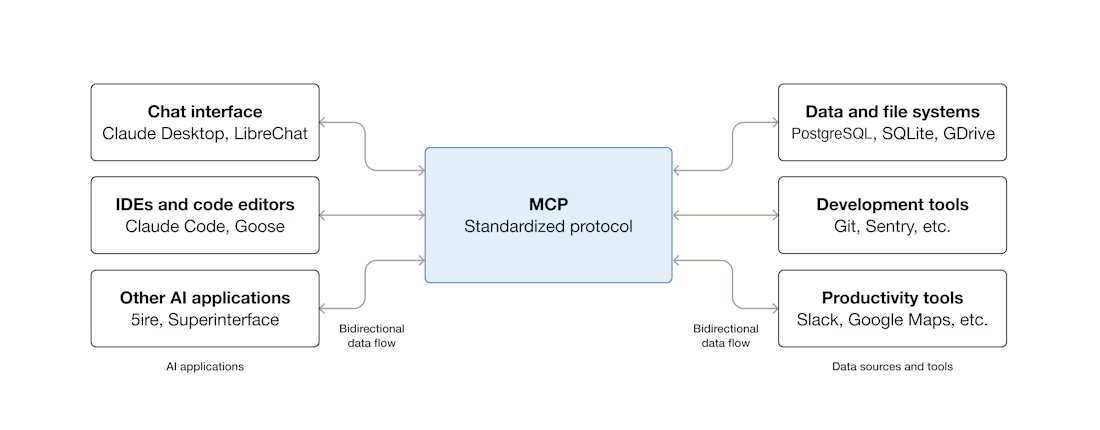
This isn't a bug. It's by design. A stateless AI platform processes each request independently, without any memory of previous interactions. Every time a user engages with the AI, it treats the session as a brand-new conversation — the system does not rely on historical data from past interactions to inform its responses.
That architectural choice has real tradeoffs. Stateless systems are easier to scale and more predictable. But the cost lands entirely on you, the user, every single session. You're not getting smarter AI over time — you're just getting faster at re-explaining yourself.
The hidden productivity drain here is what researchers call "prompt engineering overhead"**: the cognitive load of constantly reinserting context into every new conversation. This architectural limitation creates several significant problems: developers and users must constantly re-insert context into every prompt, leading to longer, more complex prompts that are difficult to maintain. Computational inefficiency means systems repeatedly process identical or similar contextual information. And without persistent memory of user preferences and past interactions, AI systems struggle to deliver truly personalized experiences that improve over time.
The experience, as one researcher aptly put it, resembles visiting a website that logs you out after every page navigation — forcing you to re-authenticate repeatedly.
Why This Hurts One-Person Businesses More Than Teams
Here's the part I don't see talked about enough: this problem scales inversely with team size.
In a larger team, context lives in multiple places — shared docs, project management tools, Slack history, onboarding materials. The AI doesn't need to remember everything because the organizational infrastructure does. Someone else already wrote it down.
When you're running everything solo? You are the organizational memory. And when your AI forgets you, there's no backup system to fill the gap. You have to be the backup system. Every time.
I've spent mornings reconstructing what should have been persistent context — re-pasting style guides, re-explaining client expectations, re-stating decisions that were made weeks ago — before I could even start the actual work. That's not a prompting problem. That's a structural one.
Three Types of Things AI Forgets — And Which Ones Matter Most
Not all forgotten context costs the same amount. I've found it useful to think in three categories.
Your Working Style and Standards
This is the foundational layer — and the most expensive to rebuild. Your preferred sentence length, how you handle technical explanations, which phrases you've explicitly told it to avoid, how formal or casual to go with a specific client. These preferences don't change session to session. But without persistent ai memory for work, you're restating them every time.
The painful irony: the more specific and refined your style, the more expensive the reset. A generic writer loses nothing when AI forgets. Someone with a carefully developed voice loses a lot.
What's Already Been Decided
This one catches people off guard. You've already decided the article won't include a competitor comparison. You've already ruled out the "10 tips" format for this client. You've already agreed on a particular framing.
Open a new session and none of that exists. The AI will cheerfully suggest the competitor comparison again. You'll reject it again. You'll explain why, again. For ongoing projects, stateless design is a serious problem. A single project is manageable — you can paste in a summary at the start of each session. But multiple projects break this approach entirely.
Wait. It does that too? Re-suggesting decisions you've already closed? Yes. Every time.
How Your Files and Tools Connect
The third category is more practical: your AI doesn't know which files exist, how your folders are organized, which version of a document is the current one, or which tool handles which part of your workflow — unless you tell it. Again.
This is where the gap between "AI assistant" and "AI that actually fits into your work" becomes most visible. A tool that doesn't know your workspace can assist with isolated tasks. It can't help you move a project forward.
Why Chat-Based AI Was Never Designed to Remember You
Sessions vs. Workspaces — A Fundamental Design Difference
Most of the AI tools people use day-to-day are built around a session model. A session has a beginning and an end. Everything that happens inside it is available to the AI. Everything outside it is gone.
This made complete sense when AI was primarily a search or Q&A tool — stateless, fast, scalable. The same architectural logic that makes it easy to scale a customer service chatbot makes it genuinely problematic for knowledge work that spans days, weeks, or months.
Developers often try to fake memory in a stateless workflow by accumulating conversation history on the client and sending the full message history with every request. This "prompt stuffing" approach has significant drawbacks: token costs grow linearly with conversation length, context window limits cause truncation of older messages, and latency increases as prompts grow. It works for short conversations but breaks down as past interactions accumulate.
The workaround most people end up using — pasting in a context document at the start of each session — is exactly this: prompt stuffing. It's functional. It's also tedious, inconsistent, and doesn't scale past two or three ongoing projects before it becomes its own job.
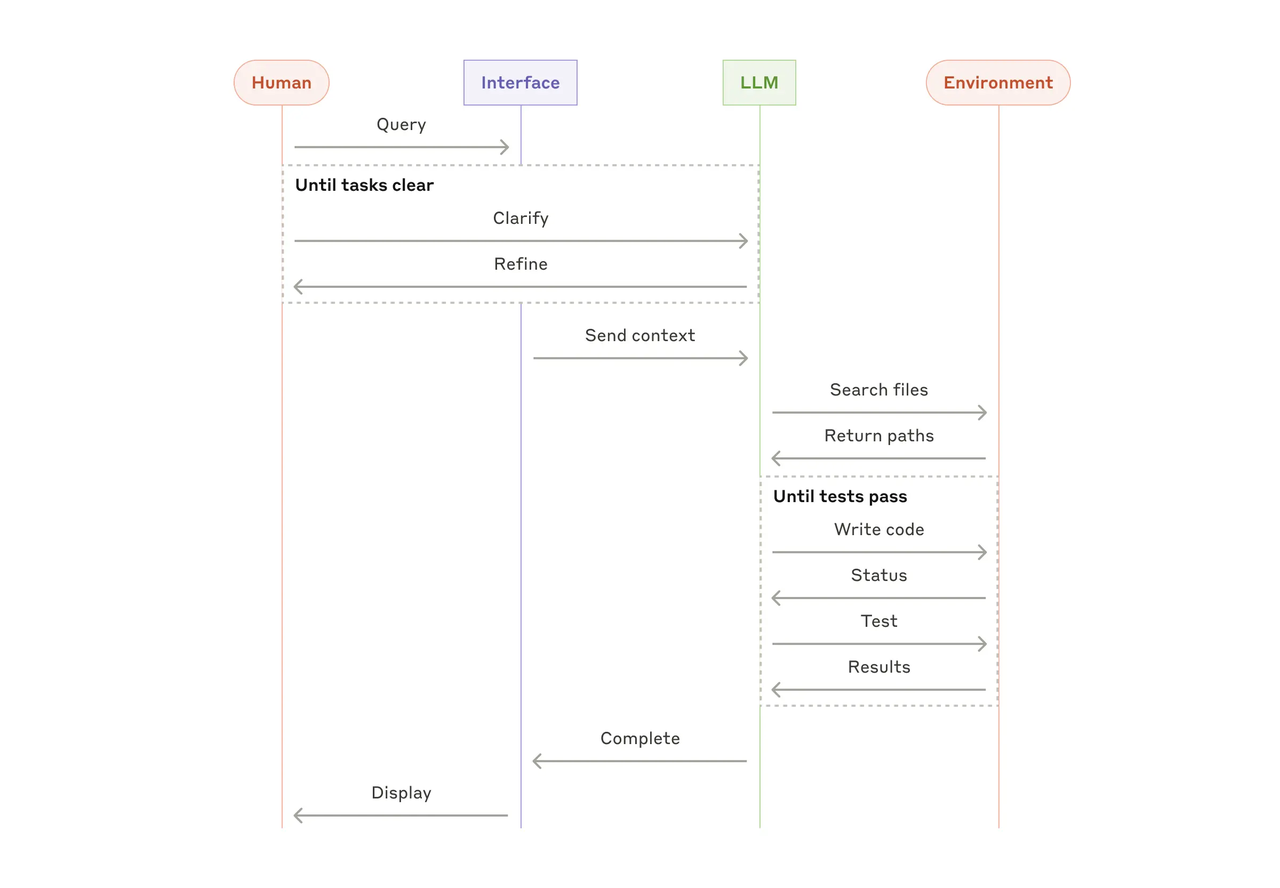
A workspace model works differently. Instead of starting fresh each session, the AI loads a persistent state — your preferences, your decisions, your project history — at session start. It picks up where you left off. As Anthropic's research on building effective agents notes, the most reliable agentic systems invest heavily in context management precisely because "what the AI knows going in determines everything about what it produces coming out."
The distinction matters: sessions are conversations. Workspaces are infrastructure.
What "AI That Remembers You" Would Actually Look Like
The Difference Between Memory, Context, and Reusable Execution
These three terms get used interchangeably, but they're not the same thing — and confusing them leads to disappointment.
Memory is storing the fact that you prefer bullet-point summaries over prose. Context is loading that preference into a session so the AI actually uses it. Reusable execution is building a workflow that runs the same task — using your preferences, your files, your standards — every time, without you reconstructing it.
Most "AI memory" features right now are memory in the narrow sense. They store some facts about you. They don't necessarily turn those facts into consistent execution.
The New Stack's deep dive on AI agent memory architecture describes four types of memory that would make AI genuinely useful across sessions: working memory (what's active right now), episodic memory (what happened in past sessions), semantic memory (what the AI has learned about you), and procedural memory (how to actually do your recurring tasks well). Most current tools have fragments of the first and traces of the second. The third and fourth are where the real gap is.
2025 was the year of "retention without understanding." Vendors rushed to add retention features — from persistent chat threads and long context windows to AI "memory spaces" and company knowledge base integrations. These were good steps forward, but they failed to solve the real issue: AI systems could recall facts, but still lacked understanding. They knew what happened, but not why it mattered.
That's the gap that actually costs solo operators time. Not whether the AI can recall your name. Whether it understands why you made the decisions you made, and carries that understanding forward.
What to Look For If You Want AI That Carries Context Forward
I'm going to be practical here rather than evaluative — I haven't fully tested every solution in this space, and the category is moving fast. But based on what I've been experimenting with, here's what I'd actually look for.
Persistent preferences that apply across sessions, not just within one. Not a document you paste — actual stored preferences the system loads automatically.
Decision logging. Some way to record "we decided X, because Y" that survives session boundaries. This is the category that most memory features still don't handle well.
Workspace-level awareness. The AI should know what files are relevant to a project, not just what you paste into the prompt. Tribe AI's research on context-aware memory systems distinguishes between "information retrieval" (finding facts on demand) and "operational memory" (knowing the state of an ongoing project). The second is what solo operators actually need.
Reusable workflows that carry context by default. The goal isn't just that AI remembers you — it's that it can run your recurring tasks correctly without you rebuilding the context each time.
It's worth noting that some enterprise platforms are already moving in this direction. Google's Vertex AI Agent Builder, for example, recently announced Memory Bank moving to general availability — allowing agents to maintain context across interactions for production workloads. The infrastructure for stateful AI is maturing at the platform level. Whether it reaches individual knowledge workers in an accessible form is the open question.
For what it's worth: Sphere Inc's analysis of AI context gaps found that what most organizations actually need isn't just retention — it's understanding. AI that doesn't just store what was said, but can reason about why it mattered. I think that's right. And I think we're still early.
I'm not sure I've fully figured out my own solution here. I'm still experimenting — some combinations work better than others for different types of projects. But I do know this: the re-explanation tax is real, and naming it is the first step to fixing it.
FAQ
Q: Does every AI tool forget me between sessions?
Most chat-based AI tools are stateless by design — meaning each new session starts without memory of the previous one. Some platforms have added memory features (Claude, ChatGPT, Gemini all have versions of this), but the depth and reliability vary significantly. As Tacnode's architecture guide on stateful vs. stateless AI agents explains, most "AI tools with memory" are actually stateless models with an external memory layer added on top — they're not inherently stateful. Worth understanding the difference before assuming a memory feature solves your problem.
Q: Isn't this what the context window is for?
The context window is what the AI can see within a single session. It's not the same as memory across sessions. A very large context window helps with long documents or complex single tasks. It doesn't help with the fact that next Tuesday, when you open a new session, that context window is completely empty again.
Q: What's the fastest workaround if I'm not switching tools?
The most practical short-term approach: maintain a "project brief" document for each ongoing project — covering your style preferences, key decisions made, things to avoid, and current status. Paste it at the start of each session. It's manual and slightly annoying, but it's reliable. The issue is that this scales poorly across multiple projects and requires you to keep the document updated, which is its own task.
Q: What's the difference between AI memory and AI context?
Memory is what the system stores between sessions. Context is what's loaded into the active conversation. A system can have memory without surfacing it as useful context — and a system can have rich in-session context without anything persisting after the session ends. For practical work, you need both: stored memory that loads as useful working context at session start.
Q: Is this problem going to solve itself as AI gets better?
Partially. Context windows are getting longer, memory features are improving, and workspace-level AI tools are emerging. But the fundamental architectural distinction between stateless and stateful systems isn't going away — it's a design choice with real tradeoffs. The more likely path is that tools purpose-built for ongoing work will handle this better than general-purpose chat interfaces, which were never really designed for it.
Q: Should I be thinking about this for solo work specifically, or is this a team problem too?
Both, but it hits solo operators harder for the reason I mentioned earlier: teams have redundant context systems (docs, project tools, shared history). Solo operators are often the only context system. When your AI forgets, there's no organizational backstop. That asymmetry makes ai memory for work a higher-priority problem for one-person operations than for most team environments.
This is based on my own experience running a solo content operation and the research I've been doing into AI memory architecture. I haven't been paid by anyone mentioned here. If you're experimenting with persistent context solutions, I'd genuinely be curious what you're finding — this space is moving fast and I'm still figuring parts of it out myself.
Previous Posts:
Get automation tips for your workflow
Weekly insights for non-technical professionals. No spam ever.