
Relevance AI vs n8n: Which One Is Right for You?
Relevance AI vs n8n: two very different tools that often come up in the same search. Here's how they actually differ and who each one is for.

Long time no see. I'm Nova. I was sitting there with two browser tabs open — one for Relevance AI, one for n8n — trying to figure out why everyone keeps mentioning both of them in the same breath. They solve automation problems, sure. But the more I dug in, the more I realized they're actually solving very different problems for very different people. That confused me at first, honestly.
So I spent a few weeks testing both, reading real user threads, and trying to understand when you'd actually pick one over the other. This is what I found.
Why These Two Tools Keep Getting Compared
They Solve Different Problems for Different Users
Here's the plot twist that took me a while to get: Relevance AI and n8n aren't really competing head-to-head. They get compared because both sit in the "AI automation" space, but their core philosophies are almost opposite.
Relevance AI is built around the idea of creating AI agents — autonomous workers you describe in plain language, give tools to, and let run. n8n is a workflow automation platform where you design every step of the logic, and AI is one capability you can wire in.
One is about building AI agents fast. The other is about controlling every node of a complex workflow. Both are genuinely useful. The question is which one matches how you actually work.
What Relevance AI Is Built For
No-Code AI Agent Builder for Non-Technical Teams
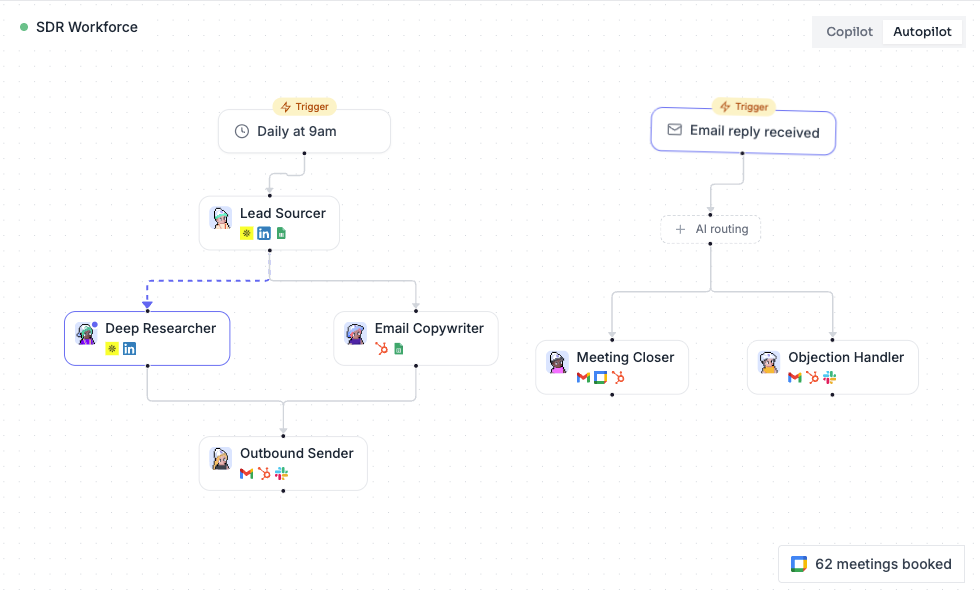
Relevance AI markets itself as a platform to build your "AI workforce" — and that framing is pretty accurate. You describe an agent's role in natural language, assign it tools (like web search, CRM access, or email), and it figures out how to execute tasks.
What I found interesting: you can go from idea to deployed agent surprisingly fast. The onboarding is polished. You pick a template, customize the agent's behavior, and test it with a real task. No need to wire up individual nodes or understand API payloads.
It's also SOC 2 Type II certified and GDPR compliant, which matters if you're handling sensitive business data.
The pricing model is usage-based — split into Actions (what your agents actually do) and Vendor Credits (AI model costs). According to Relevance AI's official documentation, the free tier gives you 200 Actions per month, while paid plans start at around $19/month for solo users. One thing worth knowing: costs can escalate quickly if agents make multiple LLM calls per task. It's flexible, but not always predictable.
Best for: Sales and marketing ops teams, support teams, non-technical operators who want agents running without writing code.
What n8n Is Built For
Developer-Friendly Workflow Automation with Full Control
n8n is open-source, and that shapes everything about it. You build workflows visually using a node-based editor — every trigger, branch, transformation, and action is visible and configurable. n8n's official pricing page shows cloud plans starting at $20/month for 2,500 workflow executions, plus a completely free Community Edition you can self-host with unlimited executions.
That self-hosting option is a big deal for teams with data control requirements. You run it on your own infrastructure — whether that's a VPS, Docker setup, or your own servers. Full ownership, no vendor lock-in.
Wait… the AI side? It's there, but you have to build it yourself. n8n includes an AI agent node that supports tool use, memory, and multi-step reasoning — but you configure it inside a broader workflow. The flexibility is real. One workflow can pull data from an API, run it through an LLM, update a CRM, and fire a Slack notification — all in one connected flow you designed yourself.
The tradeoff is setup time and technical skill. If nobody on your team can manage a server or debug a JSON payload, n8n will feel frustrating.
Best for: Developers, technical ops teams, solo builders comfortable with code, anyone who needs full data control or self-hosting.
Key Differences Side by Side
Table: Target User · Setup Complexity · AI Capability · Pricing Model · Data Control
Feature | Relevance AI | n8n |
|---|---|---|
Target User | Non-technical teams, ops leads | Developers, technical teams |
Setup Complexity | Low — guided onboarding, templates | Medium-High — node configuration, self-hosting |
AI Capability | Native agent builder, multi-agent systems | AI agent node (must wire manually) |
Pricing Model | Usage-based (Actions + Vendor Credits) | Execution-based (cloud) or free (self-hosted) |
Data Control | Cloud-only (SOC 2, GDPR compliant) | Full control via self-hosting |
Integration Count | Growing, focused on business tools | 1,100+ apps via native and community nodes |
Debugging Experience | Agent run logs, structured interface | Visual execution trace, comprehensive tools |
Open Source | No | Yes (Community Edition) |
Who Should Use Relevance AI
If your team needs AI agents running now and doesn't have developers to spare, Relevance AI is the faster path. It's designed for business operators — think sales teams building a prospecting agent, or support leads automating ticket triage.
The template library is genuinely helpful. You're not starting from scratch. And the multi-agent orchestration — where one agent delegates to another — works well for more complex workflows once you've got the basics down.
That said, I'd go in with realistic expectations around cost. The Relevance AI pricing page is worth reading carefully before you commit. If your agents run continuously or make lots of LLM calls, you'll want to model your usage before upgrading tiers.
Pick Relevance AI if: You want agents deployed fast, you're non-technical, and your main workflows are sales, support, or research-focused.
Who Should Use n8n
n8n rewards patience. The setup takes longer, but once you're running, it's remarkably powerful. You can build automations that touch 10+ apps in a single workflow, apply conditional logic, handle errors gracefully, and customize literally everything.
The open-source community is active — n8n's community forum has over 45,000 members sharing templates, debugging tips, and custom nodes. That's genuinely useful when you hit a wall at 11pm.
For teams with strict data requirements, self-hosting is the obvious choice. You decide where your data lives. No third-party cloud required.
One thing I noticed in real user feedback: the free Community Edition on self-hosted is legitimately unlimited. That's rare. If you have the technical chops to set it up, you can run complex automations without paying anything beyond your server costs.
Pick n8n if: You're technical, need full workflow control, care about data ownership, or want the lowest long-term cost.
When Neither Is the Right Fit
Okay, I'll be honest — both tools have real limits.
Relevance AI can feel constrained when you need complex branching logic or multi-step coordination across many apps. It's great at the "thinking" parts but can reach its edges when orchestration gets complicated. You often end up needing a second tool to handle the execution layer.
n8n, on the other hand, isn't built for people who want to describe a task and have an AI figure it out. The learning curve is real. If your team isn't comfortable with nodes, JSON, and occasionally reading error logs, it will slow you down more than it helps.
If you want something in between — AI-first but with workflow automation built in — tools like Lindy AI are worth a look. The Lindy vs n8n comparison (Vol 20) shows Lindy handling both agent reasoning and workflow execution in one place, which bridges the gap for teams that find n8n too technical and Relevance AI too limiting.
Still learning what you need? That's fine. Try the free tiers of both — Relevance AI gives you 200 Actions to start, and n8n's community edition is free to self-host. Small experiments tell you a lot.
FAQ
Q: Can Relevance AI and n8n work together?
Yes. They can be integrated via webhooks and API calls. Some teams use Relevance AI for the agent reasoning layer and n8n to manage longer, multi-step workflows downstream.
Q: Is n8n really free?
The Community Edition is free to self-host with unlimited executions. But running it in production typically means server costs — realistically $50–$200/month depending on your setup and scale.
Q: Which is better for a solo founder?
Depends on your technical comfort. If you want speed and no setup, Relevance AI's Pro plan at ~$19/month gets you started quickly. If you're comfortable with servers and want long-term cost control, n8n self-hosted is hard to beat.
Q: Does Relevance AI require coding?
Not really. The builder is visual and low-code. Understanding basic logic helps refine agents, but you don't need to write code to build useful workflows.
Q: Which handles data privacy better?
n8n wins here for teams with strict requirements — self-hosting means your data never leaves your own infrastructure. Relevance AI is SOC 2 Type II certified and GDPR compliant, but it is cloud-only.
Q: What's the biggest mistake people make when choosing?
Choosing features alone. The best tool depends on your team's skills, integration needs, and how much setup time you can invest — not just the feature list.
Anyway, that was fun to dig into. Both tools are genuinely good at what they're designed for — I just think a lot of people end up frustrated because they picked the wrong one for their situation. Hopefully this helps you figure out which lane you're actually in.
Back to building things.
Previous Posts:
Understand the real difference between AI agents and traditional automation workflows
Learn how to build an AI agent step by step before choosing the right tool
Explore real-world AI agent use cases to see where tools like Relevance AI actually shine
Compare AI agents vs AI assistants to better understand how these tools actually work
See how solo founders use AI tools to automate workflows without a full dev team
Get automation tips for your workflow
Weekly insights for non-technical professionals. No spam ever.