
How to Build an AI Agent: What It Actually Takes
Building an AI agent isn't as simple as picking a tool. Here's what the process actually involves — and how to decide whether doing it yourself is the right move.
Hello, Nova is coming~ I've been poking around AI tools for a while now, and lately the question I keep seeing everywhere is: "How do I build an AI agent?"
People treat it like it's one thing. Like there's a single answer. But after spending a few months experimenting with different setups — some worked, most didn't on the first try — I realized the question itself is a little misleading. What you're actually asking is closer to: "What kind of agent, for what purpose, and am I the right person to build it?"
That's what this post is actually about.
What "Building an AI Agent" Actually Means
Let me clear this up first, because I was confused about it for way longer than I should have been.
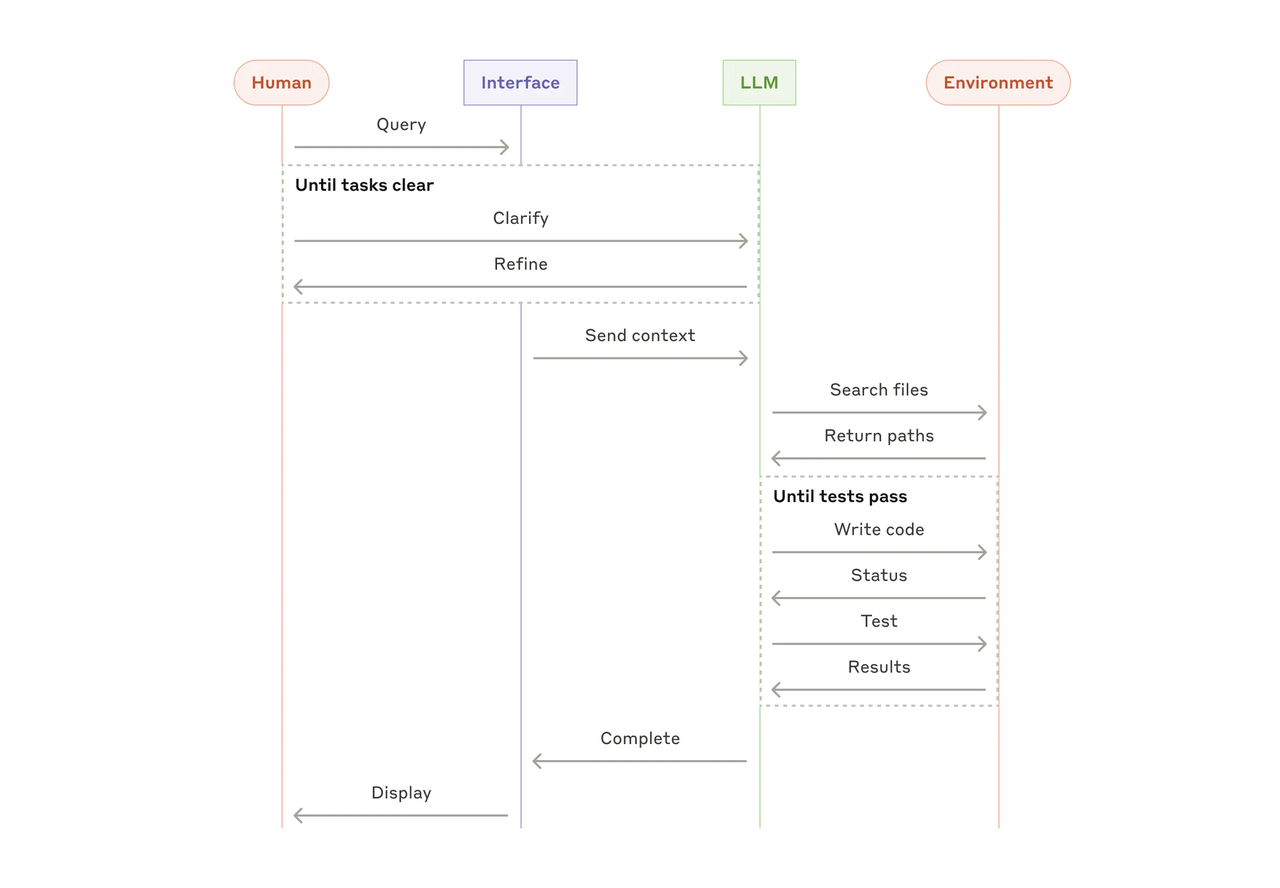
A chatbot answers questions. An AI agent takes action. It can plan multi-step tasks, use external tools, remember context across steps, and make decisions without you prompting it at every turn. The difference sounds subtle until you try to build one.
What's happening under the hood: model, memory, tool calls, execution
At its core, every AI agent is built from a few components working together:
The LLM backbone — the model doing the reasoning (GPT-4, Claude, Gemini, etc.)
Memory — short-term (what happened in this session) and sometimes long-term (a vector database of past context)
Tool calls — how the agent interacts with the outside world: searching the web, reading files, calling APIs
Execution loop — the "think → act → observe → repeat" cycle that makes it actually do things
An AI agent consists of five core components: LLM backbone, memory system, tool integration layer, planning module, and orchestration layer — missing any one of these leads to unreliable behavior in production.
That last part is the one that trips people up most. It's not hard to get an agent to run. It's hard to get it to run reliably.
The Two Paths People Take
Once you've decided you want to build something, there are really only two roads.
The code path — what it requires
This means writing Python (mostly), picking a framework, and wiring everything together yourself. The current frameworks that are actually in production use as of early 2026:
LangGraph is currently the most widely adopted for serious builds. LangGraph leads in enterprise adoption with 34.5M monthly downloads, and around 400 companies use LangGraph Platform to deploy agents in production. It models your agent as a graph of steps — which sounds nerdy, but it means you can actually see what your agent is doing and debug it properly.
CrewAI is simpler to get started with and works well if you need multiple agents collaborating on a task. Good for role-based setups (one agent researches, one writes, one reviews). You can learn more about how these frameworks compare in Langflow's 2025 framework guide.
AutoGen (from Microsoft) has some caveats worth knowing. In October 2025, Microsoft merged AutoGen with Semantic Kernel into the unified Microsoft Agent Framework, with AutoGen now in maintenance mode, receiving only bug fixes and security patches. If you're starting fresh, I'd lean toward LangGraph or CrewAI instead.
The code path requires: Python comfort, basic API knowledge, patience for debugging, and willingness to read a lot of error logs.

The no-code path — what builders can and can't do
Tools like Dify, n8n, and various visual builders let you drag and drop agent workflows without code. Dify is the most beginner-friendly option because of its visual drag-and-drop interface.
What they're genuinely good for: prototyping fast, simple automation chains, connecting common tools (email, Slack, Google Drive).
Where they hit a wall: complex conditional logic, custom memory setups, anything that needs fine-grained control over how the agent reasons. The Anthropic documentation on building effective agents is worth reading here — it lays out clearly when you need more control than no-code tools can give you.
What Building One Actually Takes — Honestly
This is the section most tutorials skip. They show you the happy path. Here's the rest of it.
Realistic time to get something stable
Getting a demo running: maybe a weekend. Getting something that works reliably on real inputs, with edge cases handled? That's weeks, sometimes months. I'm not trying to discourage you — I'm just saying don't plan your project timeline around the tutorial.
Ongoing maintenance after it's running
This one surprised me. An agent isn't deploy-and-forget. The external tools it calls change. The APIs it uses update or deprecate endpoints. The model behavior shifts between versions. You're signing up for ongoing babysitting.
Budget for three cost layers: development, infrastructure ($0.50–$15 per million tokens for LLM APIs), and ongoing maintenance at 15–25% of initial build cost annually.
The most common failure points
From what I've seen and read:
Cost explosions. An agent that loops unnecessarily makes hundreds of LLM calls, generating bills that dwarf the value delivered. Always set hard limits on turns and cost before you deploy anything.
Quality drift. Agents can drift from their intended behavior as conversation history grows longer. What worked perfectly in testing behaves strangely in production.
Silent tool failures. External APIs that fail or return different formats break agent workflows quietly. You often don't know something is broken until a user tells you.
Over-engineering architecture. Over 40% of agentic AI projects risk cancellation due to poor architecture decisions and unclear deployment strategies. The answer is almost always: start with the simplest possible version.
Who Should Actually Build Their Own
Okay. Real talk.
When custom-building genuinely makes sense
You should probably build your own agent if:
Your use case is genuinely unique. No existing tool handles the specific combination of steps you need.
You have real data privacy requirements. Self-hosted agents keep your data in your control.
You need this to scale. Managed platforms can get expensive at volume. Custom builds often have lower per-run costs.
You or your team can actually maintain it. This is the honest filter most people skip.
You can verify what the current state of various frameworks looks like by checking LangChain's official documentation — they update it regularly and it's more reliable than most tutorials.
When it's more effort than it's worth
Here's the plot twist — most people asking "how to build an AI agent" don't actually need to build one. They need an agent to exist that does a specific job.
Those are different problems.
If your task is well-defined (summarize emails, draft content from a template, schedule follow-ups), there are existing tools that handle this without code. Building customs are the right call maybe 20% of the time. The other 80%? You're paying complexity tax for something you didn't need.
If You Don't Want to Build — What the Alternatives Look Like
The no-build options are more capable than they used to be. An honest overview:
ChatGPT with custom instructions and actions — handles a lot of simple agent-like tasks. Surprisingly good for document-heavy workflows. Limitation: you're inside OpenAI's ecosystem.
n8n — the most flexible workflow tool I've come across that doesn't require deep coding. Works well for connecting many tools into an automated chain. It has a learning curve but it's learnable. Codecademy's breakdown of agent frameworks gives a clear comparison if you want to evaluate these options side by side.
Dify — visual, fast, good for prototyping. Less control, but genuinely fast to get something running.
Claude's Projects + API — if your "agent" is really just a well-prompted assistant with long memory and specific tools, the API handles a lot of this without framework overhead.
None of these are perfect. All of them are faster than building from scratch if your use case fits.
A Simple Framework to Help You Decide
Before you write a single line of code — or open any tool — ask yourself these three questions:
Can I describe this task in 2 sentences? If you can't clearly define what your agent should do and when it should stop, building it will be chaos.
Does this need to run more than once? If it's a one-time task, just do it manually. Agents earn their keep through repetition.
What breaks if it fails silently? The higher the stakes, the more you need logging, circuit breakers, and human-in-the-loop fallbacks. Building production-ready agents requires comprehensive logging of every agent step, circuit breakers that halt agents exceeding defined cost or turn limits, and human escalation pathways for cases the agent cannot handle confidently.
If you've answered all three and still want to build — go for it. The ecosystem is genuinely good right now. Just go in with clear eyes about what you're actually taking on.
FAQ
Do I need to know Python to build an AI agent?
For the code path, yes — Python is the dominant language across LangGraph, CrewAI, and most agent frameworks. For no-code tools like n8n or Dify, no.
How long does it take to build a working AI agent?
A basic working demo: 1–3 days. Something stable in production: several weeks minimum, depending on complexity.
Is LangChain still worth learning in 2026?
LangGraph (built on LangChain) is the more production-relevant path right now. LangChain itself remains the most downloaded framework, but LangGraph is what people are actually deploying.
What's the cheapest way to start?
Use a free-tier LLM API (Anthropic, OpenAI, Gemini all have them), start with CrewAI or LangGraph locally, and only add infrastructure costs once you have something working.
What's the biggest mistake beginners make?
Building too much too fast. Start with a single-agent, single-task setup. Add complexity only when the simple version is genuinely working.
Anyway — that's where I've landed after spending way too many evenings reading docs and watching agents do unexpected things.
If you're just curious about the space, honestly, even building one small thing that works is a pretty satisfying experience. And if you decide it's not worth the hassle? That's also a completely valid conclusion. Sometimes the best tool is the one someone else already built.
Back to experimenting.
Previous Posts:
Explore real-world AI agent use cases before deciding what to build
Understand the key differences between AI agents and chatbots when scoping your project
See when to use workflow builders vs AI workspaces for building agent systems
Learn what AI agent development services actually cost before building from scratch
Compare Gumloop and similar tools to evaluate no-code options for building agents
Get automation tips for your workflow
Weekly insights for non-technical professionals. No spam ever.