
Feishu CLI in a Solo Work Setup: What It Actually Takes
Want to connect Feishu CLI to your personal workflow? Here's what real solo integration looks like—and where it gets harder than expected.

Hi, Nova is coming. Recently, Feishu officially open-sourced Lark CLI, and it instantly took the developer and AI agent communities by storm. Many people are discussing how this finally allows AI assistants like Claude, Cursor, or others to directly control Feishu’s messages, calendars, documents, and multi-dimensional tables with a single command…
Sounds cool, right?
But when you move from “occasionally letting AI send messages for me” to running automated workflows on your own long-term, the reality isn’t so simple.No one is there to handle tokens that suddenly stop working, and no one is there to help you debug broken scripts in the middle of the night. You have to shoulder all the maintenance and all the pitfalls yourself.
That’s what I want to talk about—not a setup guide, nor API documentation, but what a solo operator actually faces after diving deep into the Feishu CLI.
What "Deep Integration" With Feishu CLI Actually Means
Beyond notifications — what real CLI uses looks like
A lot of people start with Feishu CLI doing lightweight things: reading out a document, pulling a message thread, maybe searching across a knowledge base. That part feels manageable. The Feishu Open Platform exposes a genuinely broad set of APIs — messaging, docs, calendars, wikis, Bitable — and the CLI wraps a good portion of them in a way that doesn't require writing full application code every time.
But "deep integration" means something different. It means you're using CLI commands as steps inside a repeating workflow — something that runs on a schedule, or gets triggered by an external event, or pipes output from one system into another. That's where it stops feeling like a shortcut and starts feeling like infrastructure.
And infrastructure, for a solo operator, means you are the ops team.
The difference between read access and action execution
This distinction matters more than most guides admit. Reading a document or pulling message history is relatively forgiving — if a command fails, nothing downstream breaks, and you can just run it again. Executing actions — sending messages, updating records, modifying calendar events, triggering downstream processes — is a different class of risk entirely.
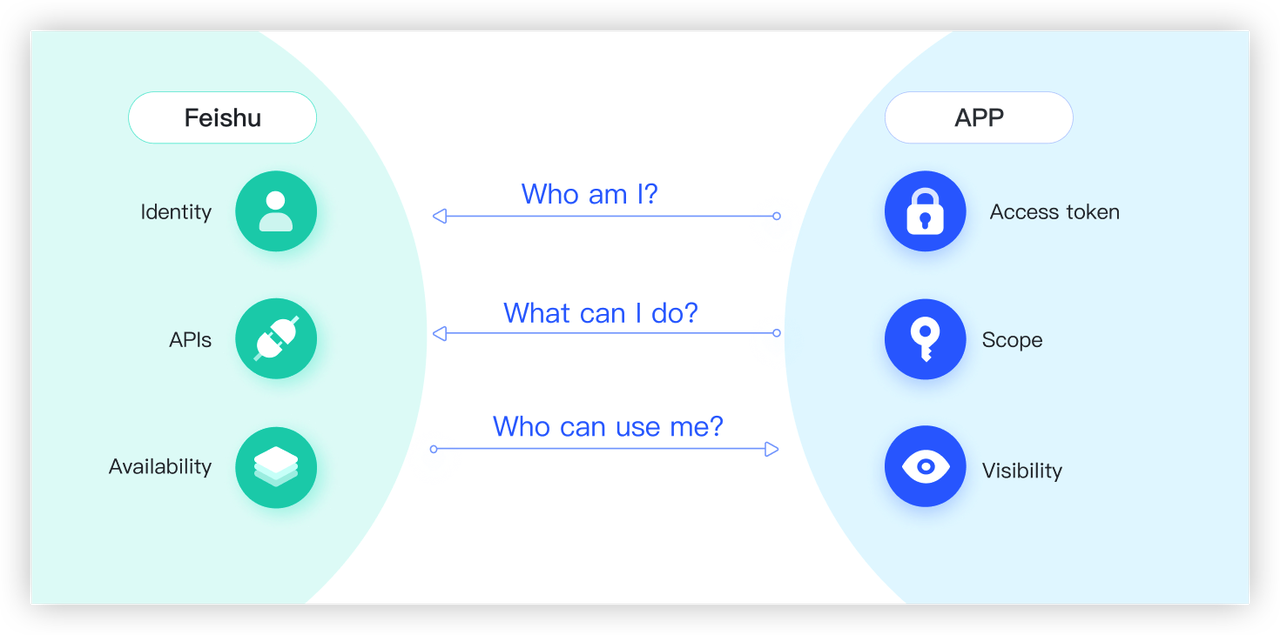
The OAuth permission scopes on the Feishu platform are separated for exactly this reason: read permissions and write/action permissions require separate approval and carry different consequences if something misfires. When you're the only person running the setup, a script that sends a duplicate message to a client group, or posts an update to the wrong channel, isn't a "dev environment bug." It's just... what happened.
Three Things Solo Operators Actually Try to Build
Pulling message threads into a working context
This is the most common starting point, and it's also the one that actually works pretty reliably. The idea: you have a running project conversation in Feishu — a group chat, a thread, a wiki page — and you want to pull that context into wherever you're doing your thinking work.
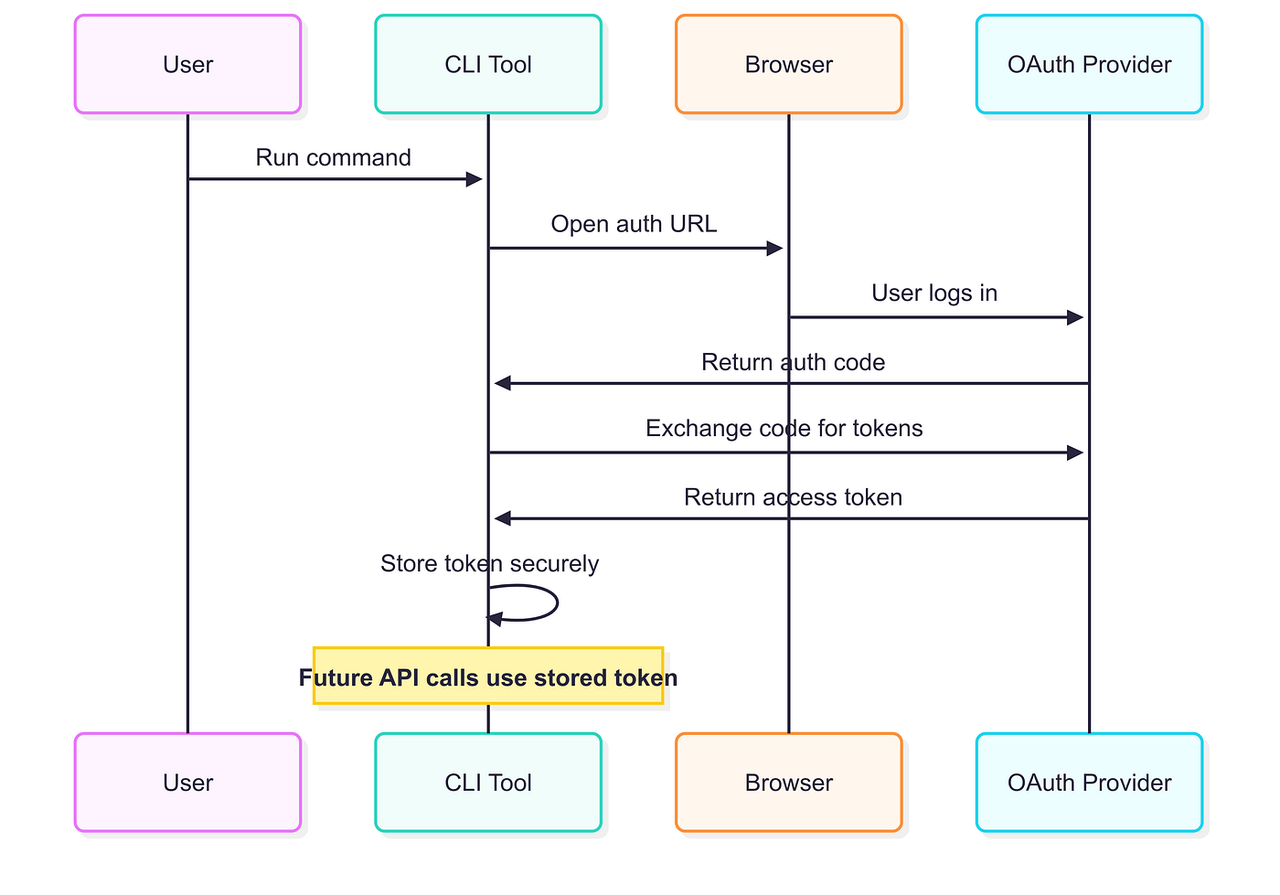
The CLI makes this possible. You can search messages by keyword, filter by chat ID, and export wiki nodes as Markdown. Where it gets interesting is the User Access Token requirement. To read messages from chats the bot isn't directly part of — which is most of your real working chats — you need a User token, not just a bot/tenant token. That means going through the OAuth flow, which is a one-time browser authentication that generates a token you then need to store and refresh.
The refresh window matters here. User access tokens have a validity period and need to be renewed periodically. If you set up a workflow and then don't touch it for a few weeks, you may come back to find everything quietly failing because the token expired and nothing told you. According to developer notes on related tools, user_access_token typically has a validity of around 2 hours and requires a refresh mechanism to stay active in automated contexts.
Triggering updates from outside Feishu
This is the scenario that looks elegant in diagrams and gets complicated in practice. The vision: something happens in your external stack (a form submission, a completed task, a webhook from another tool), and Feishu automatically gets updated — a message sent, a doc updated, a calendar event created.
The CLI isn't really designed for the "receiving end" of this. It's a command-line tool, meaning it runs when you invoke it. To make it respond to external triggers, you need something else in the middle — a cron job, a simple script runner, a lightweight server, or an automation layer that calls the CLI command on schedule or on event. That middle layer is infrastructure you're building and maintaining yourself.
For a solo operator, that often means a small script living on your machine or a cheap VPS, with no monitoring, no alerting, and no one to notice when it stops running.
Connecting Feishu data to other tools in your stack
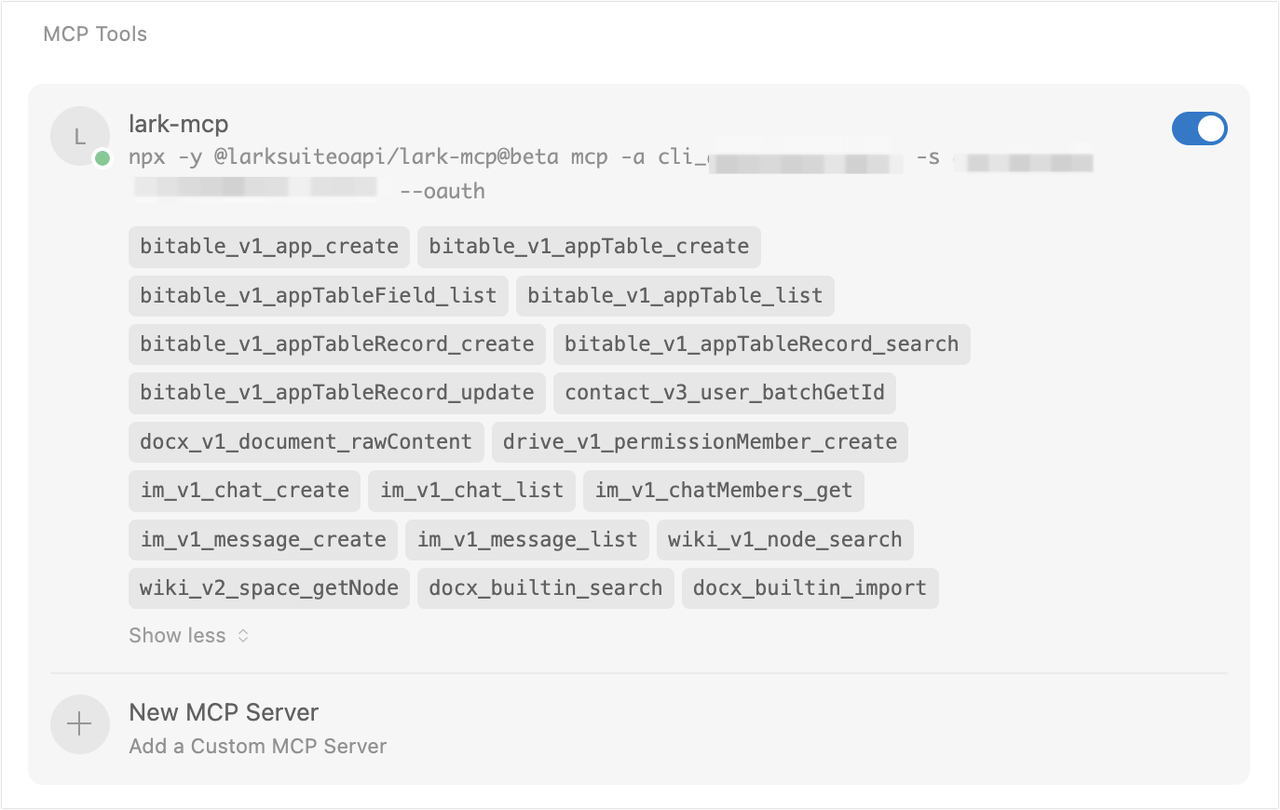
The most ambitious version of this: Feishu as a data hub, where information flows between it and your other tools — project trackers, note systems, writing environments, external databases. This is conceptually sound. Feishu's API covers enough surface area, and the Feishu/Lark official MCP integration has expanded the connective tissue between Feishu and AI-adjacent tools significantly.
But in practice, every new connection you add is another thing that can silently stop working. Each integration has its own auth model, its own rate limits, its own API versioning schedule. The complexity doesn't add linearly — it compounds. Two integrations might be manageable; five becomes a part-time maintenance job.
What the Setup Process Really Involves
Prerequisites most tutorials skip
Let's be clear about what you actually need before any of this starts working:
You need a Feishu enterprise account, or access to one. The open platform functionality isn't fully available to personal accounts. If you're on a team account, you need permission to create custom apps in the developer console. If you're truly solo and running your own Feishu workspace, this is possible, but it's not the default path most tutorials assume.
You need to create and configure an app in the developer console. This means setting a redirect URL, requesting the specific permission scopes you need, and getting those permissions approved. Some scopes are auto-approved; others require admin review, which for a solo workspace means reviewing your own request, which is fine but adds a step.
You need somewhere to store credentials that isn't just a .env file you forget about. App ID, App Secret, tokens — these need to live somewhere your scripts can reach them, ideally with some thought given to rotation and security. For a solo setup, "good enough" is acceptable; just don't skip this step entirely.
Where solo setups typically break down
I've thought through the common failure points, and they cluster around a few predictable places:
Token expiry without silent retry. This is the most common quiet failure. A workflow that ran fine for three weeks stops working, and the only signal is... nothing. No error alert, no Slack notification, because you didn't build that alerting layer. You notice when you check the output and it's stale.
Permission scope creep. You start with search:docs:read, then realize you need to write back, so you add a write scope. Then you need calendar access. Each new scope addition requires going back into the developer console, re-requesting, and in some cases re-doing the OAuth flow. Not hard, but easy to let fall behind when you're in the middle of actual work.
Environment drift. The CLI command that worked in your local terminal doesn't behave the same when called from a cron job on a VPS, because the environment variables aren't set the same way, or the Node version differs, or the working directory is wrong. These are solvable problems, but they take debugging time you didn't budget for.
What "it's working" actually means to maintain
Here's a framing shift that helped me think about this more clearly: "it's working" is not a stable state, it's a thing you actively maintain.
A live integration has a heartbeat. Tokens need refreshing. APIs occasionally change their response format. The Feishu platform will deprecate endpoints — they already have a documented deprecated API path for older auth flows — and give you a migration window. If you're not periodically checking that your setup still works, you're accumulating invisible debt.
For a solo operator, the realistic maintenance rhythm is: one check-in per month to confirm things are still running, plus an hour or two every few months to handle API updates or token rotation. That's not a lot, but it's not zero either.
The Hidden Ongoing Work
API changes and what they break
The Feishu Open Platform documentation is genuinely good, and they do communicate deprecations. But "communicated deprecation" and "you noticed the deprecation before it broke your workflow" are different things.
The specific risk for solo operators: you're not subscribed to a developer mailing list, you don't have a QA environment, and you probably don't have tests written for your CLI scripts. So when an API changes behavior — a field gets renamed, a pagination parameter changes, a new required header gets added — you find out when something breaks in production (which, for a solo operator, is also the only environment).
The practical mitigation isn't elaborate. It's just: keep your CLI and any SDK dependencies updated, bookmark the platform changelog, and build workflows that fail loudly rather than silently returning empty results.
Error handling with no dev team behind you
This is the part that genuinely requires a mindset shift. In a team environment, an API failure generates noise — someone sees it, files a ticket, it gets fixed. In a solo setup, the failure needs to generate its own noise, or it effectively doesn't exist.
What this looks like in practice:
Scripts should write to a log file, not just stdout that vanishes
Any workflow touching action execution (sending messages, updating records) should have some form of confirmation or output you can quickly scan
If a workflow is important enough to run on a schedule, it's important enough to have a one-line health check you can run manually
The underlying principle from solid developer documentation on error handling: build for the case where things break, not the case where they work. For a solo operator, this means slightly more upfront work but dramatically less "wait, when did this stop running?" time later.
For teams or developers who want a more robust framework for thinking about automation reliability, resources like the 12-Factor App methodology offer solid grounding in building maintainable, observable processes — much of it applies to solo automation setups too.

When the Effort Pays Off
Let me be honest about when this actually makes sense to invest in.
It pays off when the workflow runs frequently and the manual version is genuinely tedious. Pulling a weekly digest of project updates from multiple Feishu spaces and piping it into your notes? Worth setting up. Running the same thing once a month? Probably not — the maintenance cost will exceed the time saved.
It pays off when the failure mode is low-stakes. Read-only pipelines that pull information for your own reference are much lower risk than action-execution workflows that send messages or modify shared records. Start with the former; graduate to the latter only after you've lived with the setup for a while.
It pays off when you actually enjoy the meta-work. Some people find building and maintaining these kinds of setups genuinely satisfying — it's a small, tangible piece of personal infrastructure. If that's you, the effort feels lighter. If it feels like distraction from the actual work, it probably is.
What to Consider Before You Commit
A few questions worth sitting with before going deep on Feishu CLI integration as a solo operator:
Do you have a Feishu enterprise account with app creation permissions? This is table stakes. Without it, you're limited in what you can actually build.
What's the failure cost of this workflow? If it stops running silently for a week, what's the actual impact? If the answer is "I wouldn't notice," that's useful information about how much engineering it deserves.
Are you comfortable with the token management overhead? The OAuth flow for user access tokens is not complicated, but it's also not zero — it requires occasional intervention, especially in automated contexts. This is documented behavior in the platform's authentication model, not a bug.
Is the workflow stable enough to be worth automating? Automating something you're still figuring out is how you end up with fragile infrastructure. Get the manual version working well first. There's wisdom in resources like Google's Site Reliability Engineering principles about the costs of premature automation — even if the context is enterprise-scale, the underlying logic applies to solo setups.
The bottom line is that Feishu CLI is genuinely capable for solo operator use cases. But "capable" and "maintenance-free" are not the same thing. The integrations that hold up over time are the ones built with clear eyes about what ongoing ownership actually looks like — tokens, API changes, error handling, and all.
FAQ
Q: Do I need an enterprise Feishu account to use the CLI and open platform features?
A: You need to create an application in the Feishu developer console, which requires an account with sufficient permissions. Personal free accounts have limitations. If you're running your own team workspace, you typically have the permissions needed, but it's worth verifying before spending time on setup.
Q: What's the difference between using a bot token and a user access token?
A: A bot/tenant access token lets the app act as itself — useful for sending messages to chats the bot is a member of, or accessing documents shared with the app. A user access token lets the CLI act on behalf of a specific user, which is necessary for reading private chats, personal calendars, or documents that haven't been explicitly shared with the app. Most real-world workflows need user access tokens at some point.
Q: How often do user access tokens expire and break automated workflows?
A: User access tokens have a limited validity period and require periodic refresh. In automated setups, this means you either need to implement a token refresh mechanism or plan for re-authentication at regular intervals. The offline_access scope, when requested during authorization, enables longer-lived refresh tokens that can extend this window — but it's worth reading the current platform documentation on this, as the specifics can change.
Q: What happens when Feishu updates or deprecates an API endpoint I'm using?
A: The platform does communicate deprecations with migration guidance, but you have to be paying attention to catch them. The practical risk for solo operators is that you might not notice an API change until a workflow silently fails or returns unexpected results. Keeping dependencies updated and periodically testing your workflows manually is the most reliable mitigation.
Q: Can I run Feishu CLI workflows on a schedule without a server?
A: You can run commands locally via cron (Mac/Linux) or Task Scheduler (Windows), which works fine for many use cases. For anything that needs to run when your machine is off, or that you want to run reliably over time, some kind of always-on environment — a cheap VPS, a home server — is usually necessary. This is a real infrastructure commitment, even if a small one.
Q: Is Feishu CLI the same thing as the Lark open platform?
A: Feishu and Lark are essentially the same product — Feishu is the China version, Lark is the international version. The open platform APIs largely overlap, but credentials and app IDs created in one environment don't work in the other. If you're outside China and using Lark, make sure you're working with the Lark developer console, not the Feishu one. There's a useful clarification on this in the official Lark MCP documentation.
Q: Where's the best place to start if I want to understand the actual API scope and capability range?
A: The Feishu Open Platform developer documentation is genuinely comprehensive and well-maintained. Start with the process overview and authentication model before looking at specific API endpoints — understanding how access tokens and permissions work will save you a lot of confusion when individual API calls don't behave as expected.
Anyway, that's what I've been figuring out. Still experimenting, still learning — but hopefully this gives you a clearer picture of what you're actually building before you're in the middle of it.
Previous Posts:
Understand the trade-offs between using an AI agent and a chatbot for your workflow
Explore how to build and maintain custom AI agents with ease
Learn about alternative AI agent development services for better results
Check out the differences between Genspark and Manus for AI automation solutions
Discover alternatives to Gumloop for building efficient AI workflows
Get automation tips for your workflow
Weekly insights for non-technical professionals. No spam ever.