
Claude Code for Non-Developers in 2026: What Solo Operators Should Know
Claude Code is built for developers—but if you run a one-person business, here's what it actually means for you and whether you need it.
Hey, Nova is here. Sometime last week, a message landed in my DMs: "Nova, should I be using Claude Code? Everyone keeps talking about it."
Honestly? My first instinct was — I don't know either.
Which felt a little embarrassing. I spend most of my time researching exactly these kinds of tools. But Claude Code is getting a specific kind of developer hype that spreads fast and confuses everyone else. If you're running a solo operation — content, consulting, client work, whatever — and you've been quietly wondering if you're missing something, that's a completely reasonable place to be.
I'm not a developer. I went and figured this out the way I always do — by just going in and looking. This isn't a feature breakdown or a tutorial. It's one specific question: if you're a solo operator without a coding background, what does Claude Code actually mean to you?
What Claude Code Actually Does (in Plain Terms)
Per Anthropic's official documentation, Claude Code is "a command line tool that gives you access to Claude models directly in your terminal, allowing you to delegate complex coding tasks while maintaining transparency and control."
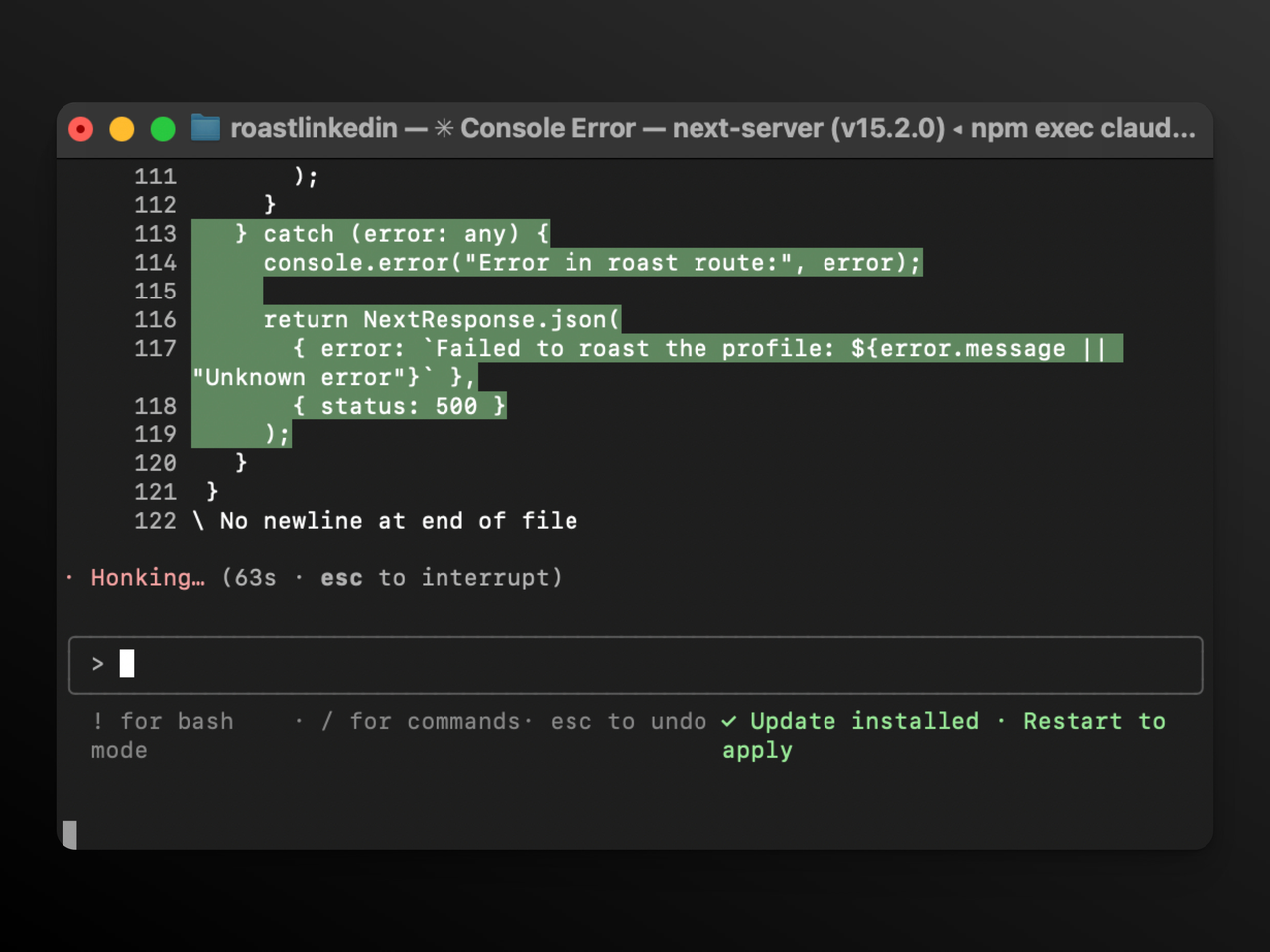
The key word is terminal. That black-box window developers use. Claude Code lives there. It can open your project folders, understand how files connect, write functions, run tests, and push to GitHub — operating directly on your actual file system.
What "Agentic Coding" Means for Non-Coders
When people say "agentic," they mean the tool takes multiple steps on its own. You say "build a login page," and Claude Code figures out the file structure, writes the components, runs the tests, and flags what broke. It functions more like an autonomous junior developer than a chat assistant.
That's genuinely powerful. But the word codebase appears everywhere in its documentation . For a reason — it assumes you have one, or are building one. This is not a smarter Claude.ai chat window. It's something much more targeted.
The Three Tools, Clearly Defined
Before going further, it helps to have a clear mental model of what's what:
Tool | Lives in | Does what | Who it's for |
|---|---|---|---|
Claude chat | Browser / app | Answers, drafts, analyzes | Everyone |
Claude Code | Terminal | Reads and edits codebases, runs commands | Developers |
Cowork | Desktop app | Executes multi-step tasks on your files | Non-technical knowledge workers |
Anthropic's official Cowork documentation describes it as "Claude Code's agentic capabilities accessible within Claude Desktop and without opening the terminal." It's the same underlying architecture, designed for people who don't want to touch a terminal.
Who Claude Code Is Really Built For
The Setup Bar — and Why It Matters
Claude Code assumes you're comfortable in a terminal, have Node.js installed, and have a reason to interact with a codebase regularly. It's a real bar. You're not opening an app and clicking "start." You're installing a CLI tool, giving it file permissions, and learning how sessions work.
For non-developers, that setup isn't insurmountable — some people have walked through it. But it takes time, and something will inevitably break mid-install.
What It Actually Costs
Per Anthropic's pricing page (verified April 2026):
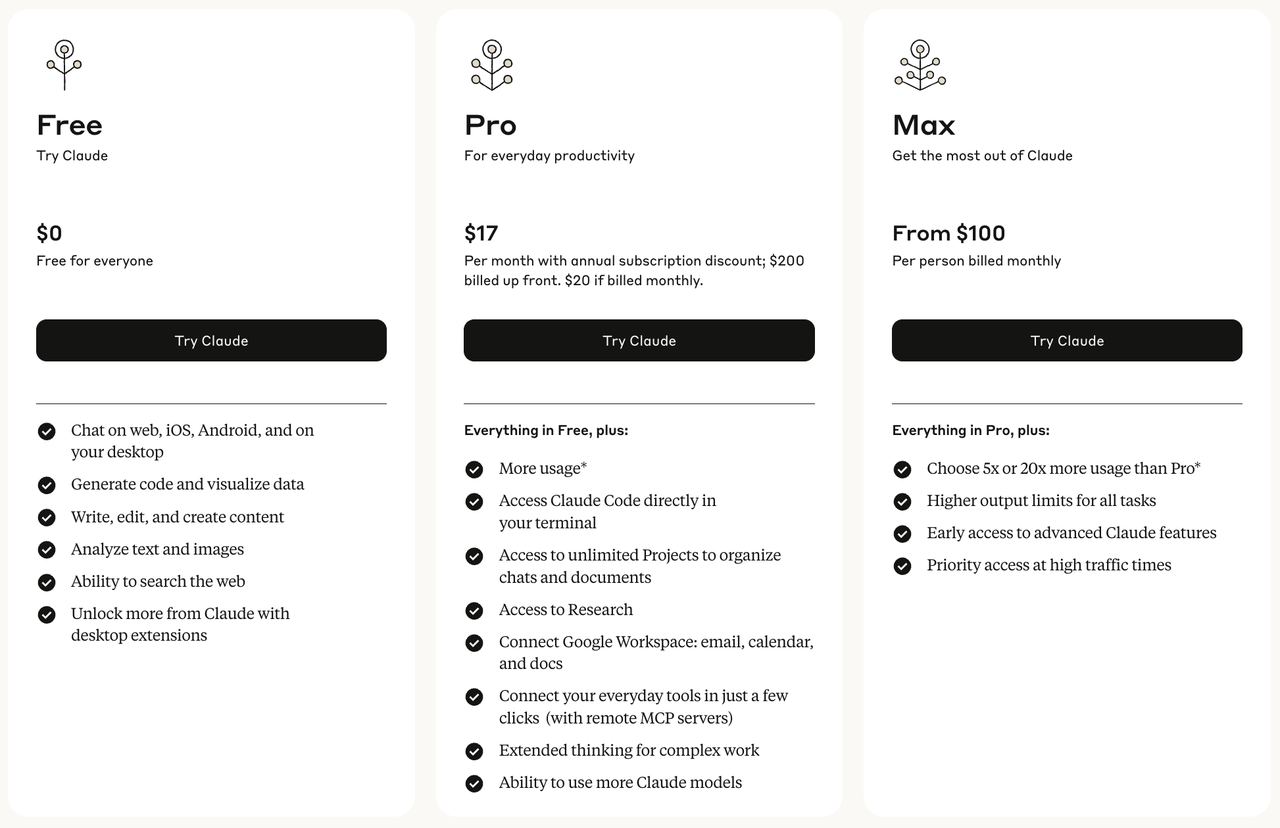
Pro: $20/month (or ~$17/month billed annually) — includes Claude Code access
Max 5x: $100/month — 5x the usage limits of Pro, plus Opus 4.6 access
Max 20x: $200/month — 20x usage limits
There is no free tier for Claude Code. You need at least a Pro subscription. Both Pro and Max plans share usage limits across Claude chat and Claude Code — meaning intensive coding sessions draw from the same budget as your regular Claude usage.
For context: according to Anthropic's own data cited by multiple sources, the average Claude Code user costs around $6 per developer per day, with 90% staying under $12/day. That projects to roughly $100–200/month at full-time use — which is exactly where the Max plan sits.
Does a Solo Operator Actually Need This?
This is the question I actually wanted to answer. Let me be direct about it.
If You Write Code or Manage Developers: Maybe
If you're a solo founder shipping your own product, or a one-person shop who manages a freelance developer, Claude Code starts making real sense. Even partial coding knowledge gets amplified significantly. You can prototype faster, understand your codebase without asking someone else, and automate repetitive technical tasks.
I'm still learning this stuff, not going to pretend otherwise. But from what I've seen: if you already spend time in GitHub or manage technical projects, the learning curve might genuinely pay off.
If You Run Content, Consulting, Ops, or Client Work: Probably Not Directly
If your day is writing, thinking, communicating, and organizing — Claude Code is not your tool. Not because it's bad, but because it's solving a different problem. It won't help you draft better proposals, organize your client pipeline, or turn research notes into a content calendar.
The honest reality: for knowledge workers, you can do more relevant things inside Claude.ai or Cowork than by forcing yourself to learn the terminal.
A Simple Decision Framework
I ended up building a quick self-evaluation after thinking through a dozen different solo operator scenarios:
Ask yourself this | If yes → | If no → |
|---|---|---|
Do I regularly open a terminal for work? | Worth trying Claude Code | Skip for now |
Do I manage or contribute to a codebase? | Worth trying Claude Code | Skip for now |
Do I want AI to execute multi-step file/research tasks? | Look at Cowork | Keep using Claude chat |
Is my main bottleneck writing, thinking, or communicating? | Go deeper on Claude chat features | — |
Am I hitting limits on the Pro plan regularly? | Consider Max 5x | Stay on Pro |
Hm. That actually simplifies a lot of the confusion I see in people's DMs.
What You Probably Need Instead
Cowork: The Part That Surprised Me
When I looked into this more carefully, Cowork is genuinely interesting for solo operators — and I'd been lumping it in with Claude Code without thinking clearly about the difference.
As VentureBeat reported at launch, Anthropic built Cowork after noticing developers were using Claude Code for non-coding work: vacation research, building slide decks, cleaning up email. "This prompted us to build Cowork: a simpler way for anyone — not just developers — to work with Claude in the very same way."
You point it at a folder. You describe what you need. Claude figures out the steps and handles it — sorting files, pulling expense data from receipt screenshots, drafting reports from scattered notes. No terminal required.
Current availability (per Anthropic's support page, verified April 2026): Cowork is a research preview available to all paid plans — Pro, Max, Team, and Enterprise — through the Claude Desktop app on Mac and Windows. This corrects an earlier claim I'd seen that it required Max; Pro access is confirmed.
When Claude Chat Is Still the Answer
For most solo operators doing writing, research, analysis, and communication: the Pro plan at $20/month already includes web search, file uploads, Google Workspace integration, extended context, and project memory. That's a lot of capability that most people haven't fully explored yet.
Mastering prompt structure and Claude's Projects feature will help you more than learning a terminal. That's the actual leverage point for knowledge workers — and it doesn't require upgrading anything.
The Real Question: Build or Use?
What "Building Your Own AI Tools" Actually Costs
Claude Code does unlock something real: you can technically build mini-apps, scrapers, and internal automations without hiring a developer. For some people, that genuinely changes what's possible.
But let's be clear about the full cost. It's not just $20/month. It's the learning time, the debugging sessions when something breaks for an unclear reason, and — as Anthropic's documentation itself notes — the fact that both Claude chat and Claude Code draw from the same usage limit. Heavy coding sessions can eat into your regular Claude budget unexpectedly.
I've watched enough people go down this road to say: without some coding foundation, the returns diminish fast. You'll spend more time fighting the tool than using it.
Where These Lands
If you're a solo operator without a coding background, the highest-ROI move is almost never "learn Claude Code." It's: get genuinely good at the AI tools already built for your workflow.
Going deep on Claude's existing chat features, Projects, and Cowork will help you more than a terminal ever will for the kind of work most solo operators actually do.
Build tools when you have a reason to. Use tools when they already exist. Most of the time, they do.
Verdict
Claude Code is genuinely impressive — I mean it. But impressive-for-whom matters.
If you write code, manage developers, or want to prototype software: explore it. The $20 Pro entry point is reasonable, and the ceiling is high.
If your work is words, relationships, and ideas: your time is better spent going deep on Claude's existing features — Projects, extended context, integrations, and Cowork. That's where the real daily value lives for most solo operators.
Oh, and one practical note: Anthropic's support page on plans is genuinely clear about what each tier includes. Worth a read before upgrading anything.
Huh. I didn't expect figuring this out to feel this simple. But that's kind of the point — sometimes the answer really is just "not for you, yet."
Anyway, that's today's little discovery. Back to building things.
FAQ
Can I use Claude Code without knowing how to code?
Technically yes — some non-technical people have made it work. But the setup involves a terminal, Node.js, and some patience with things going wrong. For most non-developers, Claude chat with Projects, or Cowork through the desktop app, is a better starting point.
What does Claude Code actually cost in 2026?
Per Anthropic's official pricing: Pro is $20/month ($17 billed annually) and includes Claude Code. Max 5x is $100/month and Max 20x is $200/month. No free access — you need at least a Pro subscription or API credits.
Is Claude Code just Claude in a terminal?
Sort of, but more capable. It can read your whole codebase, edit multiple files simultaneously, run commands, and operate autonomously across multi-step tasks. It's designed for sustained technical work, not one-off questions.
What's the difference between Claude Code and Cowork?
Claude Code is for coding and developer workflows in the terminal. Cowork is Anthropic's agent tool for general knowledge work — processing local files, running multi-step research and automation tasks — without requiring terminal skills. Both are available on Pro and Max plans through the desktop app. If agentic capabilities interest you but code doesn't, Cowork is where to start.
Should I upgrade to Max for Claude Code?
Only if you're hitting Pro limits regularly. According to Anthropic's support documentation, the best signal to upgrade is when usage interruptions happen often enough that the lost time costs more than the $80/month difference. For light or occasional use, start with a Pro and watch your usage patterns for a few weeks first.
Previous Posts:
See what maintaining your own automation system actually looks like as a solo operator
Understand whether you should build your own AI tools or use existing ones
Learn how AI agents actually work before deciding if coding tools like Claude Code matter
Explore the difference between AI agents and AI assistants for everyday workflows
See real-world AI agent use cases to understand where coding agents actually fit
Get automation tips for your workflow
Weekly insights for non-technical professionals. No spam ever.