
Best AI Agent Platform in 2026
Best ai agent platform choices in 2026 depend on workflow control, integrations, oversight, and how much you want to build.
See you again. Nova is here. Every few weeks someone asks me some version of this: "Which AI agent platform should I use?"
And the honest answer is: it depends on what you're actually trying to build — and whether you need a platform at all yet.
I've been exploring this space for a while, testing different tools, watching what sticks versus what gets quietly abandoned. What I keep noticing: the platform decision gets made too early, on the wrong criteria. People pick based on a demo, or because a tool has the most integrations listed, or because someone in a forum said it was the best. Then six months later they're locked into something that doesn't fit, or rebuilding from scratch.
So this isn't a ranked list of every AI agent platform on the market — that would be outdated before I finished writing it, and not that useful anyway. Instead, here's the decision framework I've developed for choosing, and the evaluation criteria that actually hold up over time.
The Platform Decision Framework
Before evaluating anything, I ask three questions:
What specific job does the agent need to do? Not "automate my business." Something specific — process incoming leads, summarize research, draft client updates. Vague goals produce vague agents.
Who maintains it after it's built? If the answer is "me, with no technical backup," that changes what you can realistically run. Platforms with heavy configuration requirements and fragile integrations are expensive to maintain solo.
What happens if I need to switch? This one gets ignored constantly. Data portability and logic portability are different. You might be able to export your data but not your workflow logic. Worth understanding before you build anything significant on a platform.
These three questions rule out a surprising number of options before you spend a single hour in a free trial.
Four Platform Archetypes
The "best ai agent platform" question is hard to answer in isolation because the category actually contains four meaningfully different types of tools. Calling them all "AI agent platforms" is a bit like calling spreadsheets and databases the same thing.
Builder Platforms
These are tools designed primarily for constructing agents — drag-and-drop visual builders, prompt configuration interfaces, pre-built templates. Examples in this category include Relevance AI, Gumloop, and tools like n8n with AI agent nodes layered in.
Best for: people who want to prototype something quickly without writing code, and whose agents don't need to talk to highly custom internal systems. The trade-off is usually depth — you can build fast, but complex branching logic gets awkward. Relevance AI, for instance, lets you describe an agent's purpose in natural language and suggests building blocks to match. That's genuinely useful for getting started. I checked their documentation and pricing tiers — the free tier is reasonable for experimentation, paid plans scale based on agent runs.
Deployment Platforms
These focus less on building and more on running agents reliably in production — monitoring, logging, error handling, scaling. LangSmith sits here, along with cloud-native options like Amazon Bedrock or Google Vertex AI for teams with existing cloud infrastructure.
Honestly, this category is mostly not where solo operators should be starting. If you're one person and your agent breaks, you need to fix it fast — not debug a distributed trace. But knowing this category exists matters, because some "builder" tools advertise deployment features that are actually just hosted running, not production monitoring.
Automation Platforms with AI Layers
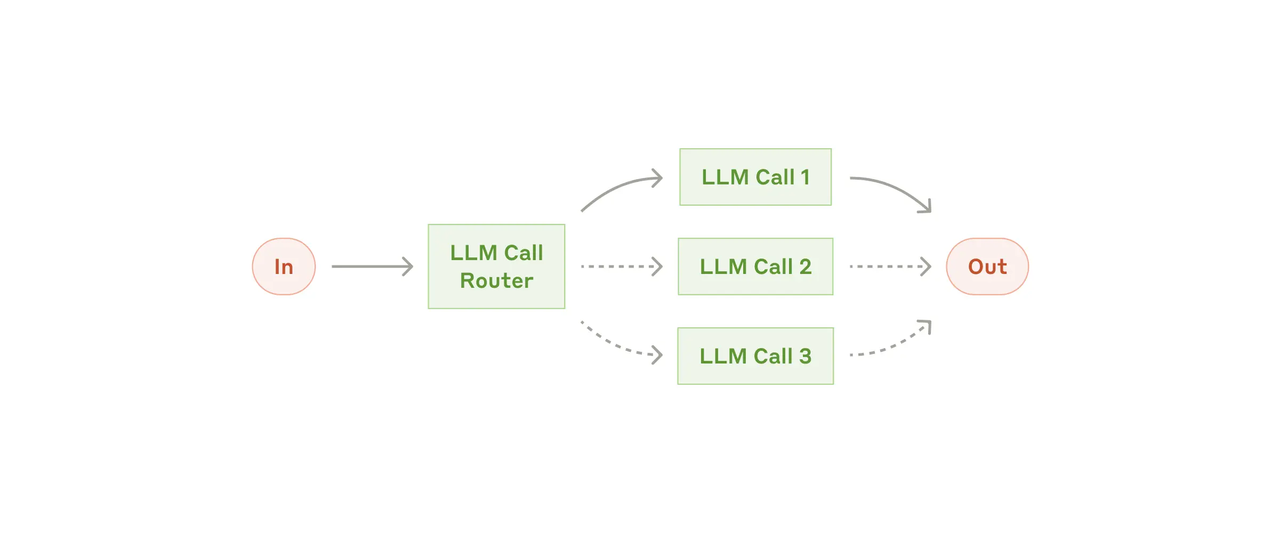
Zapier, Make, and n8n all started as pure automation tools and have since added AI agent capabilities. These are worth understanding because if you're already using one of them, you may not need a separate agent platform at all. The AI node in Zapier or n8n can handle a surprising amount of agent-like behavior — classify input, make a decision, route to different outputs.
The limitation is typically context and memory. Most automation platforms are stateless: each run starts fresh. If your agent needs to remember what happened last Tuesday with a specific client, that requires extra architecture — a connected database or document store the agent reads from. Not impossible, but adds moving parts.
Workspaces
This is the category that gets underrated. Claude.ai (with Projects), ChatGPT with custom GPTs, Notion AI — these aren't traditionally called "agent platforms" but they function as one for a large percentage of real use cases. You give the model context, a persona, and access to certain information, and it executes tasks within that context.
For solo operators, a well-configured workspace often outperforms a half-built agent on a dedicated platform. Lower maintenance cost, easier to iterate on, and no integration points to break. The tradeoff is that workspaces are generally not good at triggering automatically or taking actions in external systems without some additional plumbing.
Evaluation Matrix for Solo Operators
When I'm evaluating any ai agent development platform for my own use or recommending one to someone in a similar position, I look at five things — in this order.
Control
Can I see exactly what the agent is doing at each step, and can I override or pause it easily? An agent you can't inspect is an agent you can't trust. This matters especially when the agent is doing something consequential — sending messages, updating records, making decisions.
Some platforms give you execution logs. Some give you a dashboard. Some give you almost nothing. Try to break your prototype intentionally before you commit to a platform — send it bad input and see what happens.
Context
How does the agent hold and use information across tasks? Stateless agents are fine for isolated tasks. For anything involving ongoing work — client relationships, multi-day projects, accumulated knowledge — you need to understand exactly how context is stored and retrieved.
Anthropic's research on building effective agents is worth reading here. Their core point: complexity should be added only when it demonstrably improves outcomes. More context handling = more complexity = more things that can go wrong.
Integrations
Not "how many integrations does this platform have" — that number is usually inflated. The real question: does it connect, reliably, to the two or three specific tools your workflow actually runs on?
I've seen platforms with 500+ listed integrations where the three I needed (a specific CRM, a scheduling tool, and Google Drive) all had gaps or required workarounds. Check the specific connectors you need, not the total count.
Oversight
Related to control, but subtler. Does the platform make it easy to require human approval before the agent takes certain actions? For anything touching external communication or live data, I want a step in the workflow where I can review before it goes anywhere.
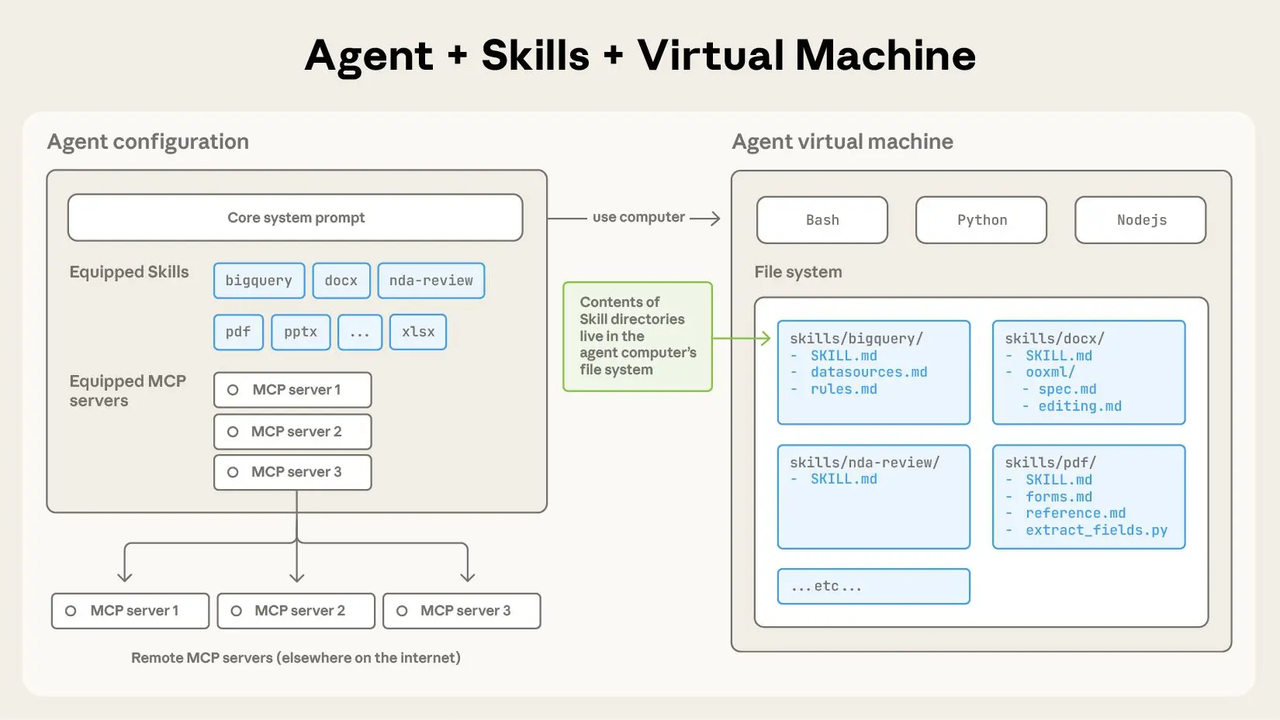
Anthropic published an open standard for cross-platform portability via Agent Skills in late 2025 — this is also relevant to how oversight layers can be designed modularly rather than baked into one proprietary system. Worth a read if you're thinking about building something that needs to last.
Portability
What does it cost to leave? If your agent logic lives entirely inside a proprietary visual builder with no export format, switching platforms means rebuilding from scratch. If your logic is expressed in prompts stored in a text file or a simple config, moving it is much easier.
I now treat this as a near-dealbreaker. I won't build anything significant on a platform that can't tell me clearly how to export my workflow logic.
Platform vs Workspace: Which Comes First?
Here's the actual question I'd ask before evaluating any ai agent builder platform: Do I even need a platform, or do I need a better-configured workspace?
A workspace — Claude Projects, a custom GPT, a Notion AI setup — can handle a large portion of what people reach for dedicated agent platforms to do. The difference is that workspaces don't trigger automatically or take actions in external systems without additional plumbing.
My working rule: start with a workspace, stay there until you hit a specific wall. That wall is usually: "I need this to run without me opening it" or "I need it to update something external." Once you hit it, you know exactly what gap the platform needs to fill — which makes the whole evaluation much more focused. You're not comparing a hundred features, you're asking whether one specific capability works reliably in your stack.
The n8n documentation on AI agent workflows is useful for understanding where automation platforms end and true agent behavior begins — particularly if you're trying to figure out which side of that line your use case actually sits on.
Run a Small Pilot Before Committing
Whatever platform you're considering, don't evaluate it in sandbox mode with clean, ideal test data. Run a small pilot with a real use case and real (if low-stakes) data.
Specifically: pick one repeated task you do at least three times a week. Set up the agent, let it run for two weeks, and measure three things: accuracy (does the output match what you'd produce manually?), reliability (does it run consistently without breaking?), and maintenance time (how much did you have to intervene or fix things?).
If accuracy is 80%+, reliability is consistent, and maintenance is under 30 minutes a week — that's probably a keeper. If any of those three are failing, that tells you whether the problem is the platform, the agent design, or the task itself.
According to Gartner's research on low-code adoption, over 70% of new enterprise applications are expected to use low-code or no-code technologies — AI agent builders are among the fastest-growing segments in that shift. But adoption rate doesn't tell you which platform is right for your situation. That still requires testing it against your actual workflow.
FAQ
Is an agent platform different from an automation tool?
Technically, yes. An automation tool like Zapier executes predefined sequences — if this, do that. An agent platform adds a reasoning layer: the agent decides what to do based on context. In practice the line is blurring, since most major automation platforms now have AI reasoning nodes. For solo operators, the distinction matters less than whether the tool does what you actually need.
Can I switch platforms later?
Yes, but the cost varies. If your agent logic lives in prompts stored as text, you can mostly copy-paste when switching. If it's buried in a proprietary visual builder with no export format, switching means rebuilding. Design with portability in mind from day one.
What integrations matter most for solo work?
The ones your workflow actually runs on today — not what you're planning to add. For most people: email, calendar, a notes tool (Notion, Google Docs), and possibly a CRM. If a platform connects reliably to those, it can handle what you need. Everything else is a bonus.
Should I start with a platform or a simple assistant?
Start with the assistant. Configure it well — give it context, define constraints, test on real tasks. Only move to a dedicated platform when you hit something it genuinely can't do: running automatically, connecting to external systems, handling volume. Most people find they need a platform less urgently than they thought.
I'm still actively testing different options here, and honestly the space is moving fast enough that anything specific I say about particular platforms might be outdated within months. What I'm more confident in is the framework — those five evaluation dimensions hold up regardless of which tools are hot at a given moment.
That's where I'd start if I were making this decision today.
Previous Posts
New to agents? Start here: why most solo operators should begin with simple workflows before building complex systems → AI Agent Workflow for Solo Founders
Still deciding between prompts, automations, and full workspaces? This breakdown maps the tradeoffs clearly → Workspace Agents vs Workflow Builders
The biggest mistake in agent building is automating too much too early — here’s how solo operators actually scale AI workflows → AI Agent Workflow Vibe Coding
Before choosing tools, it helps to understand what “AI agents” actually are in practice — and where they quietly fail → AI Agent Tools for Solo Operators Explained
If your workflows already span browser tabs, docs, and local files, this is the deeper dive on why workspace agents are becoming the next layer → AI Workspace Agents for Solo Operators
Get automation tips for your workflow
Weekly insights for non-technical professionals. No spam ever.