
AI Agents in 2026: What Solo Operators Actually Need to Know
AI agents are moving from demos to real execution in 2026. Here's what that shift means if you're running a business on your own.
Hello, everyone. I'm Nova. Today I want to talk about AI agents.
The AI agent headlines won't stop. But does any of it actually matter if you're running a one-person business? Here's a grounded breakdown of what's really shifting — and what questions are worth asking before you do anything.
I keep running a one-person content operation, and I spend more time than I should reading AI news. So when the "agentic AI" headlines started flooding my feed again this spring, my first instinct wasn't excitement. It was: okay, is this actually for me?
I've been tracking this shift for a few months now — testing specific tools, talking to other solo operators, and watching how the category evolves week by week. This is what I've actually worked out. Not just what I've read. What I've tried, what failed, and where I landed.
What's Actually Changing with AI Agents in 2026
From Answering to Executing — The Real Shift
There's a distinction I think a lot of the headlines gloss over, and it's the one that actually matters if you're working alone.
Most AI tools you've used so far are answering machines. You give them a prompt, they give you output, you go do something with it. The interaction ends there.
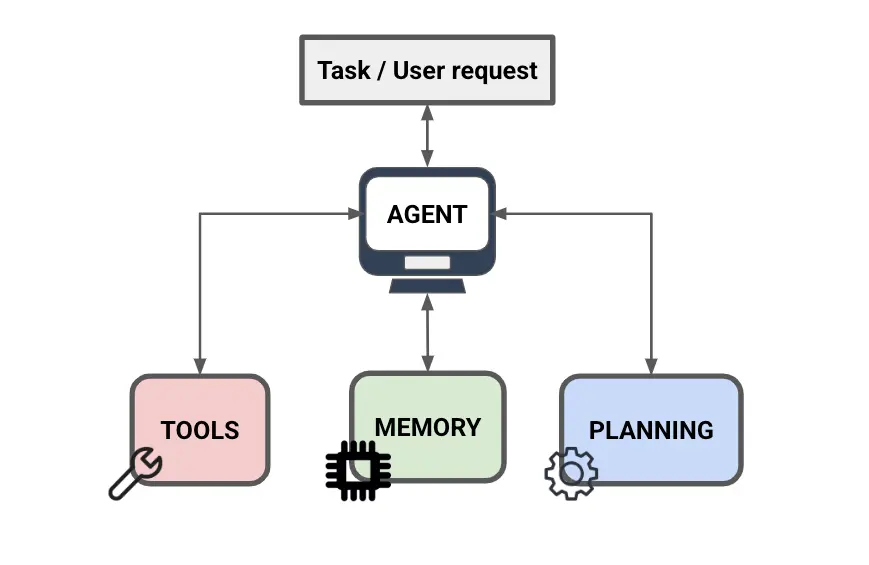
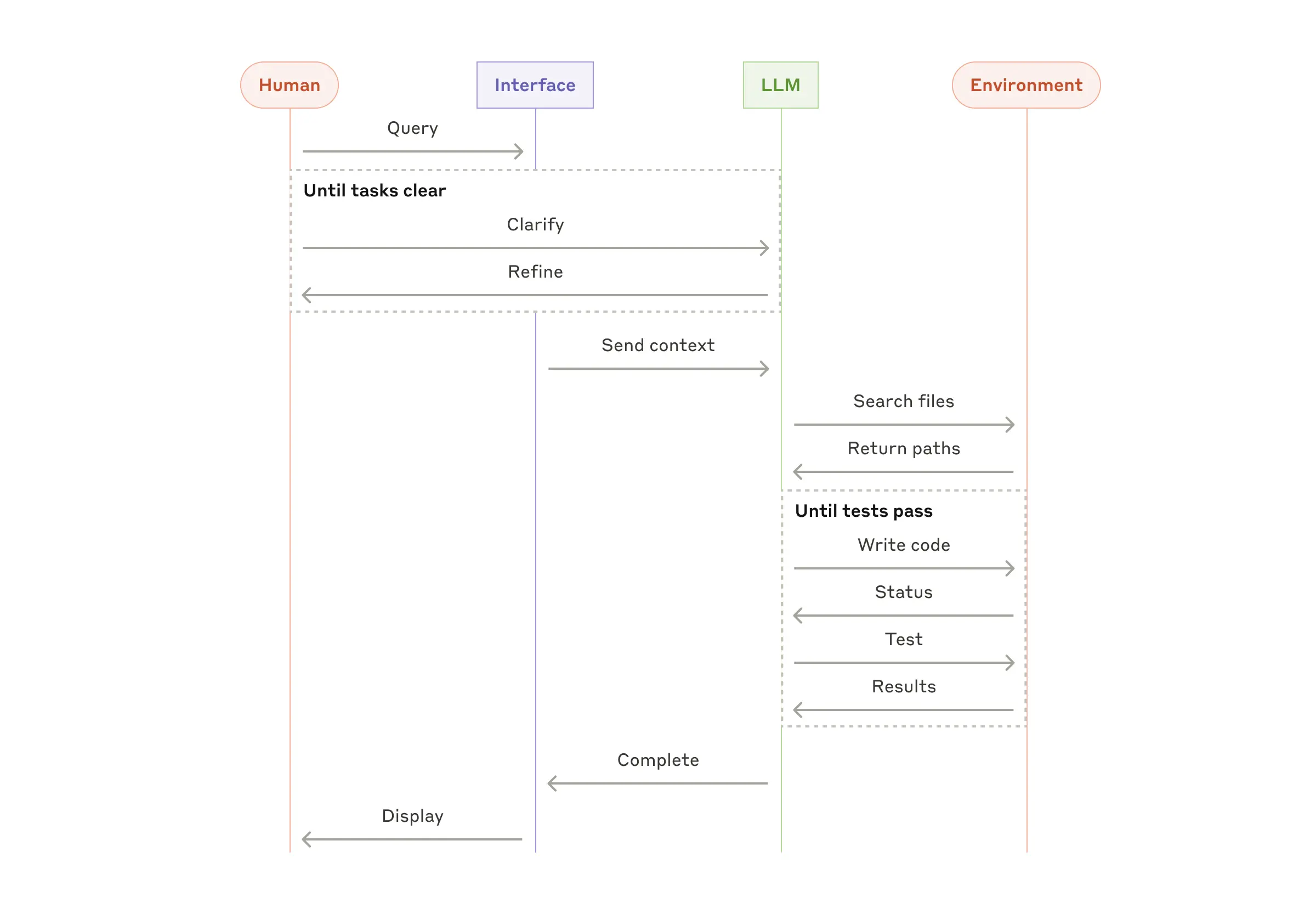
AI agents are different. They don't stop at the answer — they take the next action. They can browse a page, update a file, send a message, check a result, and loop back to fix it. The difference isn't cosmetic. It's the difference between a tool that informs you and one that does things on your behalf.
What separates agents from standard software is their ability to interpret natural language instructions, make decisions based on context, and adapt their behavior without being explicitly programmed for every scenario. The practical implication is real: an agent doesn't need you to babysit every step.
This matters more than it sounds. According to LangChain's State of Agent Engineering report — a survey of over 1,300 professionals published in late 2025 — 57% of organizations already have agents running in production, with another 30% actively developing them. Research and data analysis (24.4%) and workflow automation (64% across deployments) are the top use cases. The shift from "testing" to "actually running this at work" happened faster than most people noticed.
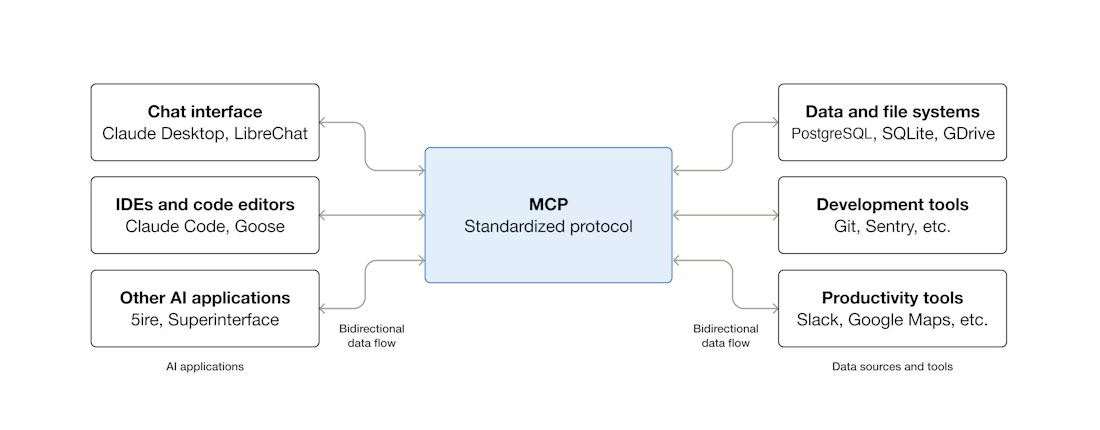
This shift is also why Anthropic's Model Context Protocol became such a big deal after its November 2024 release. MCP is the open standard that lets AI agents actually connect to your tools — Google Drive, Slack, your browser, your files — rather than just talking about them. Since launching, the community has built thousands of MCP servers, and it's now the de-facto standard for connecting agents to tools and data. That infrastructure is what makes execution-layer AI possible.
Why Google and xAI Are Both Moving This Direction
The signal I find most useful isn't any one product announcement. It's that every major player is pointing the same direction at the same time.
Google's internal AI coding agent — reportedly called Agent Smith — went so viral internally in early 2026 that Google had to throttle access. According to a Business Insider report from March 2026, Google cofounder Sergey Brin appeared at a company-wide town hall and explicitly named AI agents as a "big focus" for the year. That's not a product launch. That's leadership reorganizing internal priorities around execution.
xAI's Grok 4.20, released in beta in February 2026, took a genuinely different architectural approach: it's not a single monolithic model but a multi-agent system where four specialized agents — Grok, Harper, Benjamin, and Lucas — deliberate and debate in parallel before generating a response. I haven't personally tested the full version — it was still in limited beta as of this writing (April 2026), and the API wasn't broadly available. Treat it as a directional signal about where architecture is headed, not as a product you can go use today.
The bigger picture: Gartner forecasts that by the end of 2026, 40% of enterprise applications will embed task-specific AI agents — up from under 5% in 2025. That's not a small number. It means agent-aware tools will start showing up inside software you already use, whether you opt in or not.
What This Means for Solo Operators
You Don't Need an Internal AI Team to Benefit
Here's where I want to push back on the framing that usually comes with these headlines.
"AI agents" sounds like something enterprise IT departments deploy after six months of procurement. But the practical version of this for a solo operator is much simpler. It's just: can I package a repeatable workflow so that AI runs most of it without me restarting from scratch each time?
That's it. You don't need four agents running in parallel. You need one workflow that doesn't require you to reconstruct all the context every single time you do a recurring task.
The evidence that this is accessible is real. According to a 2025 survey cited by multiple industry reports, tools like Lindy, n8n, and Relevance AI are designed specifically for non-technical solo operators, with no-code interfaces that connect to Gmail, Notion, Slack, and popular CRMs through native connectors — setup rarely requires coding.
I've been experimenting with this for the past few months — specifically trying to set up structured workflows for content research that run without me re-explaining my process every time. Some of it works. Some of it absolutely does not. More on that in a second.
The Problem That Still Isn't Solved: Context Loss and Repeated Setup
This is the part nobody in the hype cycle talks about enough.
Execution-ready AI still requires someone to do the thinking upfront. The agent doesn't know your business, your voice, your standards, or your edge cases — until you teach it. And that setup process is real work.
I learned this the uncomfortable way. I tried to hand off a weekly research summary task to an agent workflow in late February 2026. My setup: I used n8n connected to a web scraper and Claude's API, with a system prompt defining output format and source criteria. The first two runs were fine. The third run, it started pulling in sources I'd never use, ignored the format I'd specified, and generated something I had to completely redo. I went back and looked at what happened: I'd written the source criteria too loosely ("relevant industry news") without specifying recency windows or domain exclusions. The agent didn't "forget" — it just never had what it needed to begin with.
The gap between "runs automatically" and "runs well" is almost entirely about how well you've defined the task upfront. Good agents don't remove judgment — they move it earlier in the process.
This isn't just my experience. LangChain's survey found that quality remains the single biggest barrier to production, cited by 32% of respondents — ahead of cost and latency. Consistency, accuracy, and adherence to format were the top failure modes. That tracks exactly with what I ran into.
Worth noting: according to research cited by the Federal Reserve's April 2026 monitoring report on AI adoption, work-related GenAI adoption stood at approximately 41% of the US workforce as of November 2025, growing by about 31% in one year. Adoption is real. The quality problem is also real.
What Execution-Ready AI Looks Like in Practice
A Framework I've Found Useful: Three Types of Agentic Tasks
Not all automation opportunities are created equal. After testing a few different workflow configurations over the past few months, I've landed on a rough categorization that helps me decide what's worth handing off:
Type 1 — Scheduled synthesis tasks. These run on a clock without any trigger from me: weekly briefings, competitor monitoring, recurring report drafts. Low interaction is required. High payoff if the format is well-defined. This is where I've had the most consistent success.
Type 2 — Triggered response tasks. An agent fires when a condition is met — an email arrives, a form is submitted, a threshold is crossed. These require more careful scoping of the trigger logic, but once it's right, they run reliably.
Type 3 — On-demand multi-step tasks. You initiate these manually when you need them — "run a deep research pass on this topic and structure it for an article." These are the hardest to get right, because the edge cases are wide and the outputs are harder to validate quickly.
My honest take: Type 1 is where solo operators get the most consistent leverage with the least setup cost. Start there before you try to automate anything involving judgment or variable inputs.
Packaging Repeatable Work vs. Prompting from Scratch
The practical distinction I've landed on: prompting from scratch is a conversation. Packaged workflows are infrastructure.
Every time you start fresh with a new prompt, you're rebuilding context — your situation, your constraints, your format preferences. Fine for one-off tasks. But if you're doing the same category of work every week — competitive research, content drafts, client updates — rebuilding that context each time is just wasted attention.
The better version is to invest once in defining the workflow clearly: what inputs it needs, what decisions it makes, what the output looks like, and where it should stop and ask you something. That upfront investment — I'd budget 2-4 hours for a moderately complex workflow — pays off across every future run.
Okay, this is the part where the actual work is. And honestly? I underestimated it at first.
When "Keeps Running in the Background" Actually Helps a One-Person Business
There's a specific category of task where background execution genuinely matters: monitoring and recurring synthesis.
If you're tracking a niche topic, watching for changes in competitor positioning, or pulling together a weekly brief from multiple sources — these are tasks where the value compounds over time, and where the bottleneck isn't your ability to do the work, it's remembering to do it consistently.
That's where an agent that runs on a schedule, without needing you to trigger it, creates real leverage. Not dramatic leverage. Just the quiet kind where something gets done reliably and you don't have to think about it.
Some agents operate as conversational assistants you interact with directly, while others work in the background, monitoring systems for specific events and taking action when conditions are met. For solo operators, both types have a place — but the background category tends to be underused.
What to Look For, What to Skip
A Practical Evaluation Matrix for Solo Operators
Before adopting any agent tool or workflow layer, I now run it through four questions. This came out of watching myself — and other solo operators I know — make the same mistake of adopting for novelty rather than fit.
Is the task repeatable at least weekly? If you'll only do this task once or twice a month, the setup cost rarely pays off. Weekly cadence is the minimum for most agent workflows to generate real time savings.
Can you define a bad output in one sentence? If you can't describe what "wrong" looks like clearly, you can't reliably catch failures — which means the agent is working unsupervised in a way you haven't actually authorized.
Do you currently do this manually and consistently? Agents don't create discipline — they accelerate whatever you're already doing. If you skip the manual version half the time, the automated version will be unreliable too, because the inputs will be inconsistent.
What's the cost of a missed error? For a draft that you review before publishing: low. For an automated email response to a client: high. Calibrate your review process to this, not to how much you trust the tool.
Don't Adopt for the Sake of Adopting
I'll just say it directly: most people reading the AI agent headlines don't need to do anything new this week. The category is maturing fast, and the tools available in three months will be better than what's available now.
The trap I've watched a lot of solo operators fall into is adding an agent layer to a process that wasn't well-defined to begin with. The agent doesn't fix unclear process — it amplifies it. Garbage in, garbage out, but faster.
As Anthropic's engineering team noted in their writeup on building effective agents: "Success in the LLM space isn*'t about building the most sophisticated system. It's about building the right system for your needs." That principle applies at the solo-operator level more than anywhere else.
Also: a growing body of research shows that agents built from large language models can exhibit unpredictable behaviors even in benign settings. The 2025 LangChain survey found that quality issues — not cost — remain the top barrier to production deployment. That's not a reason to avoid agents. It's a reason to keep scope tight and review outputs, especially early on.
Bottom Line
The shift from AI that answers to AI that executes is real. It's not hype — the infrastructure is genuinely there now in a way it wasn't a year ago. The LangChain survey, the Gartner forecasts, the Federal Reserve adoption data: the numbers all point the same direction.
But the gap between "can run automatically" and "runs well for your specific work" is still almost entirely on you to close.
For solo operators, the honest version of this isn't: "deploy an AI team." It's: "find one recurring task that's well-defined enough to hand off, run it for a month, and see what breaks."
That's a much smaller question. And it's a much more useful starting point than most of the headlines suggest.
I'm still experimenting with this. That part never really ends.
Look — the agents are real. The execution is real. The part where you still have to think carefully before handing anything off? Also very real.
So maybe the move isn't to chase the headline. Maybe it's just to find one small thing, set it up properly, and see what happens.
That's what I'm doing, anyway.
Alright, that's today's little discovery. Catch you next time.
FAQ
Q: Do I need to code anything to use AI agents as a solo operator?
Not necessarily. Tools like Lindy, n8n, and Relevance AI offer no-code interfaces for setting up agent workflows, with visual builders and prebuilt templates that connect to Gmail, Slack, and Google Calendar. That said, more complex or custom setups still benefit from some technical comfort. Start with the no-code options and see how far they take you before adding complexity.
Q: What's the difference between an AI agent and a chatbot?
A chatbot responds to what you type. An agent can take action — browse a URL, update a document, send a message, check an output — without you doing each step manually. The key difference is execution versus response. A chatbot waits for your next prompt. An agent pursues a goal until it's done or until it hits something it needs to ask you about.
Q: What's MCP and why does it keep coming up?
Model Context Protocol is the open standard Anthropic released in November 2024 that lets AI agents connect to external tools and data sources in a standardized way. It's now the de-facto protocol across the industry for agent-tool integration. You don't need to understand the technical details — but it's why agents can now reliably connect to your actual files and apps, rather than just generating text about them.
Q: Are AI agents reliable enough to trust with real work?
Depends heavily on the task and how well you've set it up. For narrow, well-defined, repeatable tasks with easy-to-review outputs: yes, increasingly. For anything complex, ambiguous, or high-stakes: keep a human review step in the loop. LangChain's 2025 survey found that 71% of employees prefer AI-generated content to be reviewed by a human before use — even at organizations actively using agents in production. That's not excessive caution. That's calibrated trust.
Q: Should I wait before investing time in this?
For most solo operators: yes — at least wait until you have one specific workflow in mind. The tools are improving fast. Setting up a vague "AI agent strategy" right now is likely to waste more time than it saves. The clearer the task, the faster the setup pays off. Start specific, start small, review everything at least for the first four to six runs.
Previous Posts:
Get automation tips for your workflow
Weekly insights for non-technical professionals. No spam ever.