
AI Agent Workflow: Fixing What Vibe Coding Breaks
Vibe coding moves fast — until it doesn't. Here's why structured AI agent workflows are what solo developers actually need to ship reliably.143 chars
Hey, I'm Nova, I started paying serious attention to this problem around mid-2025, after watching the same pattern repeat in different communities I follow. Someone ships something fast with AI, feels amazing for two weeks, then spends a month untangling a mess they can barely understand.
Sound familiar?
The promise was never a problem. The missing structure was.
The Promise of Vibe Coding
Why It Attracted Solo Builders
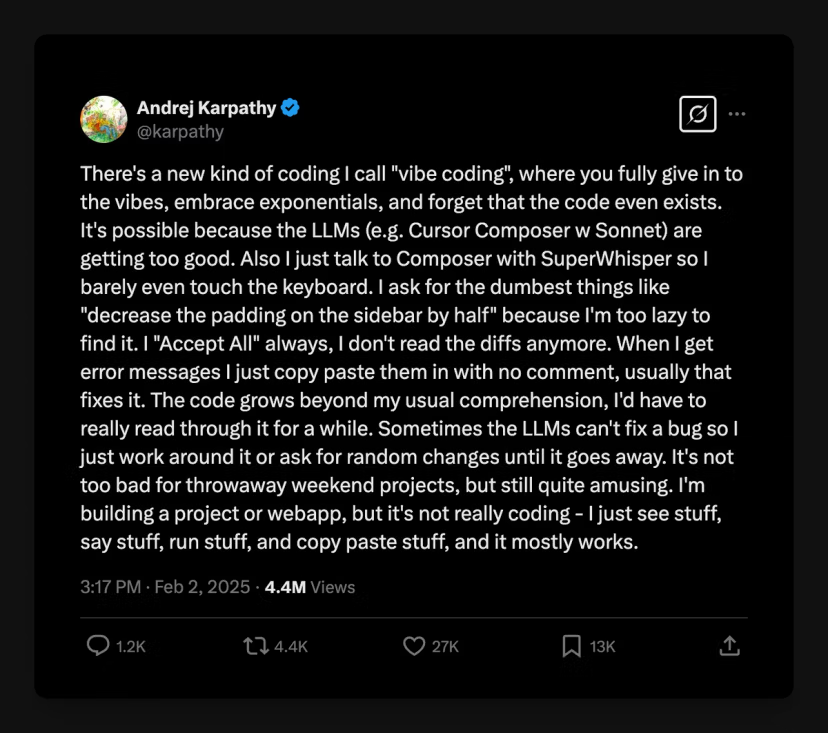
When Andrej Karpathy coined "vibe coding" in February 2025, he described a form of coding where you "fully give in to the vibes, embrace exponentials, and forget that the code even exists." For solo builders and non-developers, that framing was genuinely exciting. No more syntax anxiety, no gatekeeping from technical knowledge. Just describe what you want and watch it appear.
And it worked — at least in the beginning. By 2026, 72% of developers use AI-powered coding tools daily, and 41% of global code is AI-generated. Y Combinator reported that 25% of its Winter 2025 batch ran codebases that were 95% AI-generated. The speed gains were real.
But speed without structure isn't productivity. It's just faster debt accumulation.
Why Vibe Coding Breaks Without Structure
No Plan, No Guardrails, No Review Loop
Here's the thing that took me a while to internalize. Vibe coding doesn't fail because AI is bad at writing code. It fails because most people use it without any plan, any enforced rules, or any review step between generation and deployment.
Every time you change your mind mid-build, you incur a little more tech debt — vestiges of the old ideas still hanging around in the code. This tech debt confuses future agents working in the code, which leads to a vicious cycle of more and more bugs.
The process feels like progress because output is constantly appearing. But "stuff appearing on screen" is not the same thing as "a working system you can extend and maintain."
Currently, vibe coding agents see your requirements as preferences, not as enforced policies. They don't do what they promised. To ensure reliable agent behavior, systems must treat policies as strict rules.
This is the gap a real AI agent workflow closes.
The Compounding Error Problem
A December 2025 analysis by CodeRabbit of 470 open-source GitHub pull requests found that code co-authored by generative AI contained approximately 1.7 times more "major" issues compared to human-written code — including misconfigurations (75% more common) and security vulnerabilities (2.74x higher).
I read that and immediately thought about a pattern I see constantly: each error multiplies downstream. The AI fixes one thing and breaks two others, because it doesn't see the full dependency chain. AI is often unaware of the full codebase context, especially in large, complex architectures — an agent fixes a bug in one file but causes breaking changes in files referencing it, simply because it didn't see the connection.
This isn't a reason to stop using AI. It's a reason to build a workflow where this failure mode gets caught before it compounds.
What a Real AI Agent Workflow Looks Like
Brainstorm → Plan → Execute as a Structured Chain
The shift from vibe coding to a structured AI agent workflow isn't about adding bureaucracy. It's about doing the thinking before the code appears.
Instead of iterating in code, iterate on the plan. The details are expensive to work out in code — even when an agent is writing it. Work through them in a planning document first.
A simple structure that actually works:
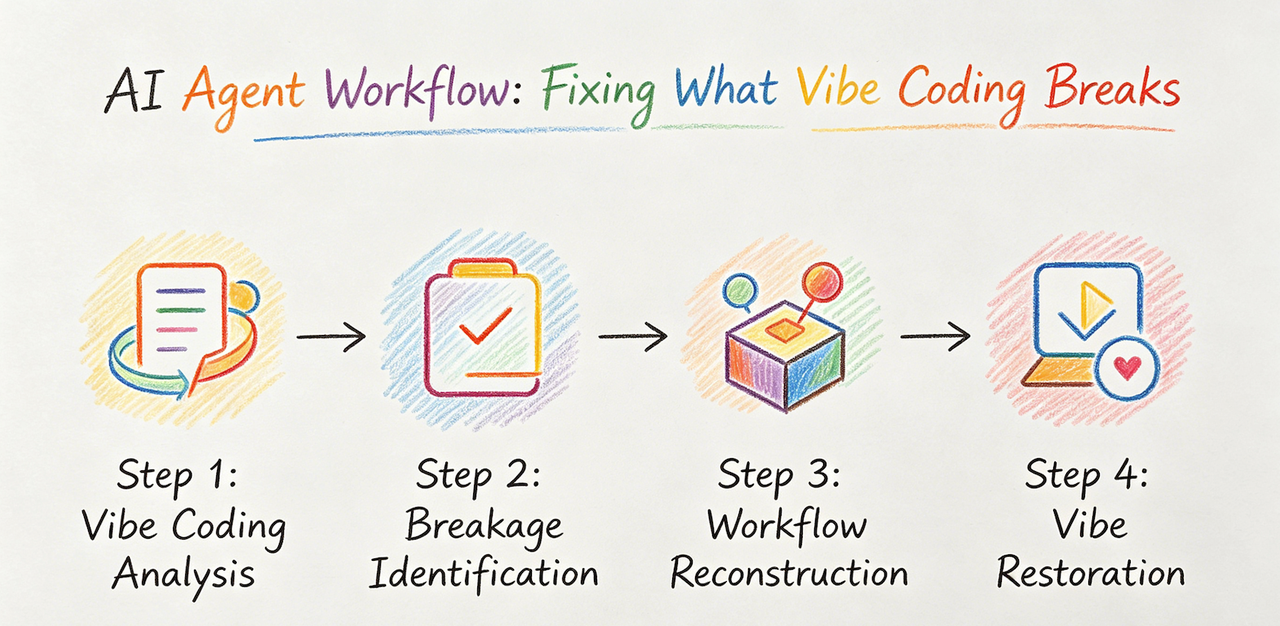
Step 1 — Specification. Write a plain-language spec before touching any tool. What does this do? What are the edge cases? What should it never do? This document is what AI will read. The more precise it is, the more precise the output.
Step 2 — Plan review. Run the spec through the agent in "plan mode" (Claude Code has this natively). Ask it to surface ambiguities. Fix them before execution.
Step 3 — Bounded execution. Give the agent one task at a time, not an entire feature. If you ask for too much in one go, it's likely to get confused or produce a "jumbled mess" that's hard to untangle — like 10 devs working without talking to each other. The fix is to stop, back up, and split the problem into smaller pieces.
Step 4 — Review output before accepting. This sounds obvious. Most vibe coders skip it.
Where Human Checkpoints Belong
Not everywhere — that defeats the point. But at minimum: before merging any changes to main, and after any step that touches authentication, data handling, or external API calls. Those are the places where a "hallucinated bypass" — where an AI accidentally removes a security check — is most likely to occur.
AI Agent Workflow as a System (Not Prompts)
Why Structure Beats One-Off Outputs
This is the reframe that changed how I think about AI coding tools. The goal isn't to get one good output from one good prompt. The goal is to build a system that produces consistent, reviewable outputs every time.
The value comes when agents operate inside conventions, structured specifications, and deterministic processes. A growing number of teams are adopting spec-driven development (SDD) where structured specifications drive what agents produce and ad hoc prompts are eliminated.
Concretely: your project folder should have an AGENTS.md or CLAUDE.md file that tells the agent your architecture, your naming conventions, your forbidden patterns, and your coding standards. This persists across sessions. The agent builds on accumulated context rather than starting from scratch every time.
From Prompting to Repeatable Execution
Think of the workflow as layers. At the top, human decisions: what to build, what quality bar to hold, what to review. In the middle, structured specs that the agent reads. At the bottom, the agent executes within those constraints.
The most powerful emerging pattern in 2026 is the agent-driven test loop: the coding agent writes code, generates tests, runs them, fixes failures, and iterates — all before opening a PR.
That loop only works if the agent has something to test against. Which is why the spec has to come first.
The GitFlow Model for AI Agent Workflows (AITDD)
Code Review Built Into the Agent Loop
AI Test-Driven Development (AITDD) is a pattern gaining traction among teams that have moved past the vibe coding phase. The logic borrows from TDD: write the tests first, then have the agent write code that passes them.
When paired, TDD gives structure to your flow, and agentic coding gives speed to your structure. This combination shines when working with complex logic files — pricing engines, rules-based validators, or multi-condition workflows.
In practice: write a failing test that describes the expected behavior. Tell the agent "make this test pass." The test becomes the spec. The test becomes the review mechanism. You don't need to read every line of code — you need to know the tests pass and the edge cases are covered.
Kalvium Labs, a team of 200+ engineers, standardized the use of Claude Code for pull request reviews, cutting time-to-first-commit by 35–40%. Their mandatory "AI Review" process caught 2–3 potential production bugs weekly.
Why Versioning and Iteration Matter
Run everything through version control. Every. Single. Change. The reason isn't just about rollback — it's about making the agent's decisions auditable. When something breaks (and it will), you need to see exactly what changed and when.
The GitFlow model maps cleanly: feature branches for each bounded task, PRs as human review checkpoints, main branch protected. The agent never commits directly to main. You do.
Which AI Coding Tools Fit Into the Workflow
Claude Code vs Cursor vs Codex vs OpenCode
I've spent time with all four. Here's my honest take on where each fits inside a structured workflow, not as standalone tools.
Claude Code is the strongest choice when you need deep codebase reasoning across large, multi-file tasks. It reads your repository structure, knows your branch state, creates commits with meaningful messages, and can open pull requests directly. The hooks system lets you enforce project-specific rules — linting, testing, formatting — that run automatically before and after certain actions. The CLAUDE.md file is genuinely useful for persisting project context across sessions. Best for: complex refactors, architectural decisions, projects where context depth matters.
Cursor is the right tool for the daily interactive coding loop. Use Cursor for everyday coding with a visual IDE. Codex for autonomous background tasks. Claude Code for deep multi-file work that needs maximum context. The Composer mode handles multi-file edits cleanly. Tab autocomplete is fast. If you're most comfortable working visually inside an editor, Cursor is the better daily driver.
Codex (OpenAI) shines for asynchronous, well-defined tasks. Assign tasks asynchronously — Codex spins up a sandboxed VM, works independently, and delivers a pull request. Best for routine features, test generation, and documentation. I find it less useful for tasks that require iterative human feedback during execution.
OpenCode is the open-source wildcard. Through Models.dev integration, it connects to over 75 LLM providers out of the box. You can route different tasks to different models: a cheap, fast model for simple questions, a reasoning model for architecture decisions, and a coding-specialized model for implementation. Best for developers who want maximum model flexibility and don't want vendor lock-in.
Honestly? The developers I've seen get the best results in 2026 aren't dogmatic about one tool. They use Cursor for interactive daily work, Claude Code for complex reasoning tasks, and Codex for background execution.
Gemini CLI and GitHub Copilot CLI for Terminal Users
If you live in the terminal and want lighter tooling: GitHub Copilot CLI handles natural-language shell command generation cleanly. Gemini CLI is a strong option for Google ecosystem users. Neither replaces a full agent workflow, but both fit well as supporting tools in the execution layer.
AI Agent Workflows for Solo Operators Who Don't Code
Structured Execution Outside Development
Wait — this matters even if you never write a line of code. The same structure that prevents vibe coding disasters applies to any multi-step AI workflow: content pipelines, research processes, document analysis, client deliverable generation.
The pattern is identical: spec first, bounded execution, human review before output goes anywhere important. I use a version of this for my own content work. The "agent" is a structured prompt chain. The "tests" are a self-check list before anything publishes. The "version control" is a simple dated changelog in a Notion doc.
It doesn't need to be code. It needs to be intentional.
FAQ About AI Agent Workflows
Is an AI Agent Workflow Better Than Vibe Coding?
For one-off prototypes or personal projects you plan to throw away: vibe coding is fine. Fast, fun, low stakes. For anything you intend to extend, maintain, or show to users: yes, a structured AI agent workflow will produce better outcomes with less total rework. Vibe coding gets you about 70% of the way there — the first draft looks great, but as features get added and you try to iterate, the application starts breaking and a human still has to pick up the slack. Structure closes that gap.
Do You Need to Know How to Code?
Not necessarily, but you need to be comfortable reading outputs and catching things that look wrong. The review step requires judgment, not syntax knowledge. If you can't evaluate whether the output does what you asked, you can't catch the failure modes that compound. That's true regardless of tool.
What Tools Should You Start With?
Start simple. Pick one agent tool and one version control habit. Cursor at $20/month is the most accessible entry point for non-terminal users. Claude Code is worth the upgrade when you're working with larger or more complex projects. The tool matters less than the workflow discipline around it.
As one practitioner I follow put it: the best results come when you apply classic software engineering discipline to your AI collaborations. Design before coding, write tests, use version control, maintain standards — these not only still apply, but are even more important when an AI is writing half your code.
That's the whole thing, really. The vibes are still welcome. The guardrails are just what make them last.
Previous Posts:
→ See why vibe coding breaks without structure and what replaces it
→ Learn how AI agents actually work for solo operators (beyond prompts)
→ Understand how to build repeatable AI workflows instead of one-off outputs
→ Explore the shift from chat-based AI to persistent, stateful agents
→ Discover how one-person businesses scale using AI systems, not just tools
Get automation tips for your workflow
Weekly insights for non-technical professionals. No spam ever.