
Agentic AI Tools for Real Work
Agentic AI tools help with multi-step work, but choosing one requires checking oversight, context, permissions, and failure handling.
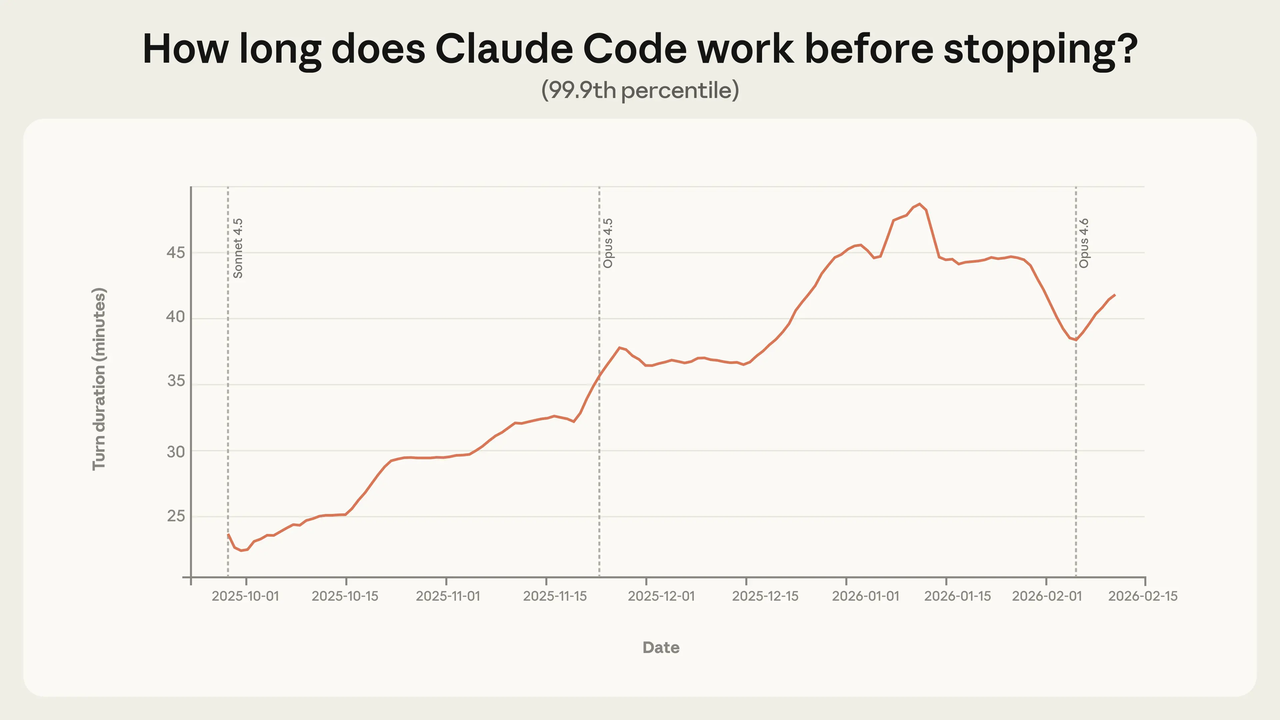
I've been experimenting with agentic AI tools for about a year now, and the one thing I'd tell past-me is this: the category name is doing a lot of heavy lifting. "Agentic AI" covers everything from a chat assistant that can draft an email to a coding agent that runs a 45-minute autonomous task across your entire codebase. Those two things are not the same tool, and treating them interchangeably is how people get frustrated or, worse, give an AI more rope than they intended.
This article is a category map, not a ranking. If you're trying to figure out which type of agentic tool fits your actual work, start here.
Start With the Level of Autonomy You Need
Before you look at any specific product, get honest about what you actually want the AI to do.
There's a spectrum:
You prompt, it responds — single-turn, you're always steering
You give a goal, it plans steps — multi-turn, you approve checkpoints
You give a goal, it runs — truly autonomous, it stops only when done or stuck
Most people buying "agentic AI" are really buying the middle option. That's fine — it's often the right choice. But the marketing for the third option sounds like the second, which is where things get muddy.
Anthropic's own research on how people actually use Claude Code is instructive here. According to their analysis of agent autonomy in practice, newer users auto-approve roughly 20% of sessions, while experienced users reach over 40% after 750+ sessions. Trust with these tools isn't set and forget — it compounds gradually as you learn what the agent handles well and where it needs watching.
That pattern maps neatly onto how I'd suggest you approach every tool in this category: start with more checkpoints than you think you need, not fewer.
Category Map of Agentic AI Tools
Five distinct types, different design premises, different risk profiles.
Assistants, Workflow Agents, Builders, Coding Agents, and Workspaces
Assistants (Claude, ChatGPT, Gemini in chat mode) — The baseline. These aren't really "agentic" in the full sense; they respond to prompts and can use tools like web search or file reading, but they don't run autonomously between sessions. They're the right starting point if you're new to this category and want to build intuition before handing anything more autonomous to an AI. The low-risk entry point.
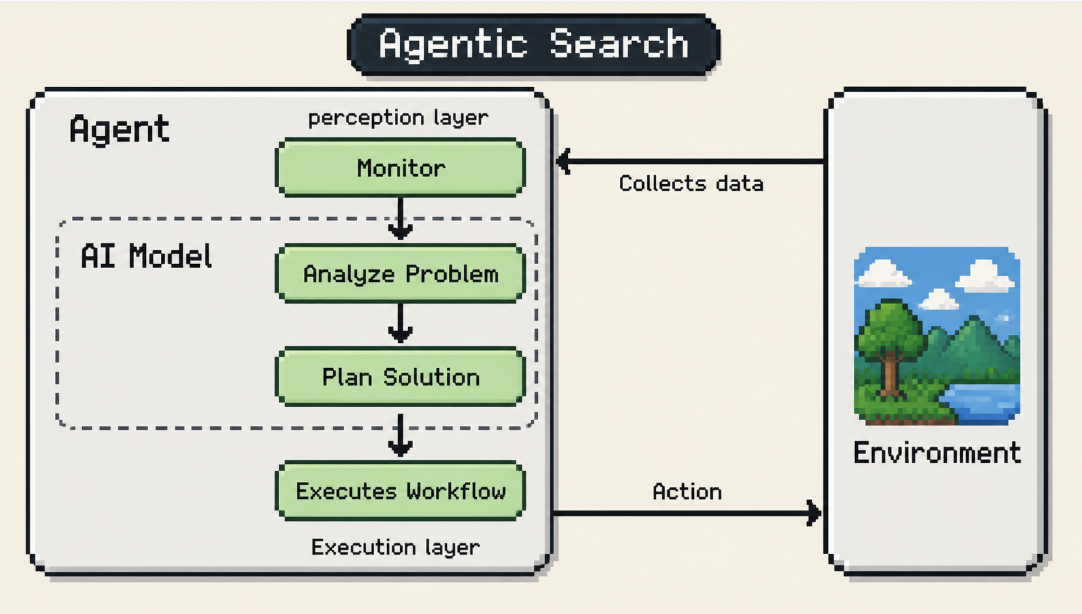
Workflow agents (n8n, Zapier Agents, Make with AI steps) — These connect to your apps and run triggered or scheduled actions. A workflow agent might monitor your inbox, extract action items, create tasks in a project tool, and log the result — automatically, without you opening anything. Zapier's Agents documentation explains how this differs from standard automation: the agent decides which actions to take based on context, not a fixed script. The autonomy is scoped by the trigger and the workflow you define. This is the category most solo operators should explore first for repeatable, low-stakes automation.
Builders / no-code agent platforms (Lindy, Relevance AI) — Tools that let you define an agent's behavior, connect its tools, and deploy it as a persistent worker. You're not writing code, but you're designing the logic. The upside is flexibility; the downside is that the setup requires more thought than a workflow agent, and "agent judgment" becomes a real variable in the output quality. Best for operators who've identified a specific workflow and want it handled consistently.
Coding agents (Claude Code, Codex, Cursor's agent mode) — A category of their own because the risk profile is different. A coding agent reads your codebase, makes changes across files, runs tests, and iterates on failures. According to Anthropic's documentation on Claude Code's design, the default behavior is cautious: it asks before modifying files or running commands. Auto-approve exists, but it's a setting you turn on deliberately, not the default. This matters. Don't skip the default.
AI workspaces (cross-app desktop tools that coordinate files, browser, and connected services) — The newest and roughest category. The premise: instead of switching between apps, the AI sits above all of them and coordinates. The setup cost is highest here, and the tools vary most in maturity. Worth exploring if your work is genuinely cross-app, but not the place to start if you're new to agentic tools.
Real Work Examples for Solo Operators
Abstract categories don't help much until you see them mapped to actual tasks. Here's how these play out in practice:
Client research before a call. You paste five URLs into an assistant, ask it to pull the key facts from each, and synthesize a prep brief. No autonomy beyond the conversation — pure assistant mode. Takes 4 minutes instead of 20. This is the thing most people skip to, and it's genuinely valuable without being complicated.
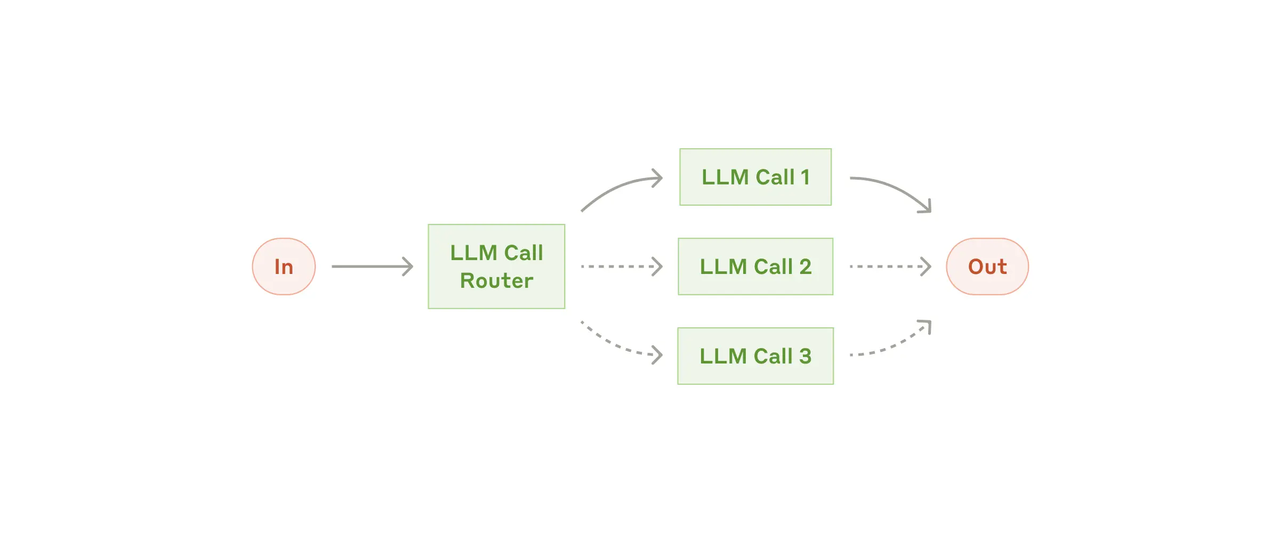
Weekly report assembly. A workflow agent monitors a project folder, pulls the week's completed tasks from your project tool via integration, and drafts a status summary on a schedule. You review and send. The AI writes; you approve. Anthropic's research on building effective agents calls this "augmented LLM" — AI with tool access, human at the key decision point. Sweet spot for workflow agents.
Content editing pipeline. You draft a piece, drop it in a folder, and a builder-style agent runs it through your defined checklist (tone, structure, length, keyword density) and flags issues. You fix. The agent isn't publishing anything — it's an automated reviewer with a consistent lens. Saves the slog of re-reading with fresh eyes every time.
Bug investigation in a codebase. You describe the issue to Claude Code, it reads the relevant files, proposes a fix, runs the test suite, and iterates until tests pass. You review the diff before merging. The Claude Code documentation makes clear that permission modes are designed for exactly this balance — auto-approving file edits in a dev environment while still requiring explicit approval for riskier shell commands.
What I haven't automated and won't. Client deliverables that ship without my review. Emails that commit me to anything. Billing, invoicing changes, or anything touching payment systems. Decisions where being wrong isn't recoverable.
Risk Controls Before You Let Tools Act
This is the section most guides skip because it's less exciting than the capability overview. It's also the one you'll want to have read.
Permissions, Approvals, Logs, and Rollback
Permissions first. Every agentic tool has some concept of scope — what accounts it can access, what actions it can take, what files it can touch. Set these explicitly before the first run. Don't accept defaults for anything you'd care about if it went wrong. Narrow is always safer than broad to start.
Approval checkpoints aren't a sign the tool is weak. They're the design. Claude Code's default requires approval before file changes or command execution because autonomous tools running unchecked are the failure mode, not the feature. I keep "ask before acting" on for any session involving accounts I use for client work.
Logs are your recovery path. If an agent does something unexpected, you need to be able to see what it did and in what order. Check whether the tool you're evaluating produces an activity log that's human-readable, not just a debug dump. Some tools do this well; others treat it as an afterthought.
Reversibility should be a first-order consideration. Anthropic's research on agent design notes a principle I've internalized: prefer reversible actions, and require confirmation for destructive or irreversible ones. Before running any agentic task, I ask: if this goes sideways, can I undo it in under 10 minutes? If the answer is no, I want human approval in the loop before the action executes.
The EU AI Act is starting to affect how some of these tools are offered in regulated contexts — an indication that governance around agentic tools is a real and evolving area, not just vendor marketing.
Choose by Autonomy Level, Not Hype
The hype cycle around agentic AI tools right now is running about 18 months ahead of where most tools actually are for solo operators. That's not a reason to avoid the category — it's a reason to be specific about what you're buying.
Here's the framework I use:
The question isn't which category is most advanced. It's which one matches the task you're trying to hand off — and whether the failure modes in that category are ones you can recover from.
I'm still experimenting with the higher-autonomy end of this. There's more here I haven't figured out. But after a year of using these tools at various levels, the thing that's consistently true: the operators getting the most out of agentic AI are the ones who started at the assistant level, learned the failure modes, and expanded autonomy deliberately from there.
Not the ones who plugged in the most autonomous tool first and hoped for the best.
FAQ
Do agentic tools need access to my apps?
Depends on the tool type. Assistants don't — you bring the content to them. Workflow agents and builders generally do need integrations to act on your behalf, but good tools let you scope exactly which accounts and which actions are permitted. The principle: grant the minimum access needed for the specific task, not blanket access to everything. You can always expand later.
Can I pause or approve steps before they run?
Yes, for most well-designed tools. Claude Code's permission mode system, for example, explicitly offers graduated control from "approve every action" through to "run autonomously." The default for most coding agents is the cautious end of that spectrum. For workflow agents, approval gates are a design feature you build into the workflow. If a tool doesn't offer step-level approval and you're running anything with write access to accounts you care about, treat that as a gap worth understanding before you deploy.
How much setup time should I expect?
More than the marketing suggests, less than you might fear. For assistants: near zero — you just start using them. For workflow agents: a few hours to connect accounts, define triggers, and test the workflow on a small sample. For builders and coding agents: a full day or more to configure scope, test edge cases, and build enough confidence to let something run without you watching every step. The setup investment front-loads the time you'd otherwise spend correcting mistakes.
Previous Posts:
Previous Posts:
Most people call everything “AI agents” now — but assistants, workflow agents, coding agents, and workspaces fail in very different ways: AI workspace agents explained for solo operators
If you’re trying to understand where agentic workflows actually help (and where they quietly create more overhead), start here: AI agent workflows and vibe coding for solo builders
Why most solo operators over-focus on model quality when the real productivity gains usually come from workflow structure instead: AI workflow for solo founders
Workflow builders and workspace agents sound similar in demos — but they solve different problems once your work crosses apps and files: Workspace agents vs workflow builders
Claude Managed Agents, coding agents, and autonomous AI tools all sit on different points of the autonomy spectrum — this breakdown helps clarify the difference: What are Claude Managed Agents?
Get automation tips for your workflow
Weekly insights for non-technical professionals. No spam ever.